Distribution Matrix
The second tab of Master Doc. Register: who reviews each document, in which order.
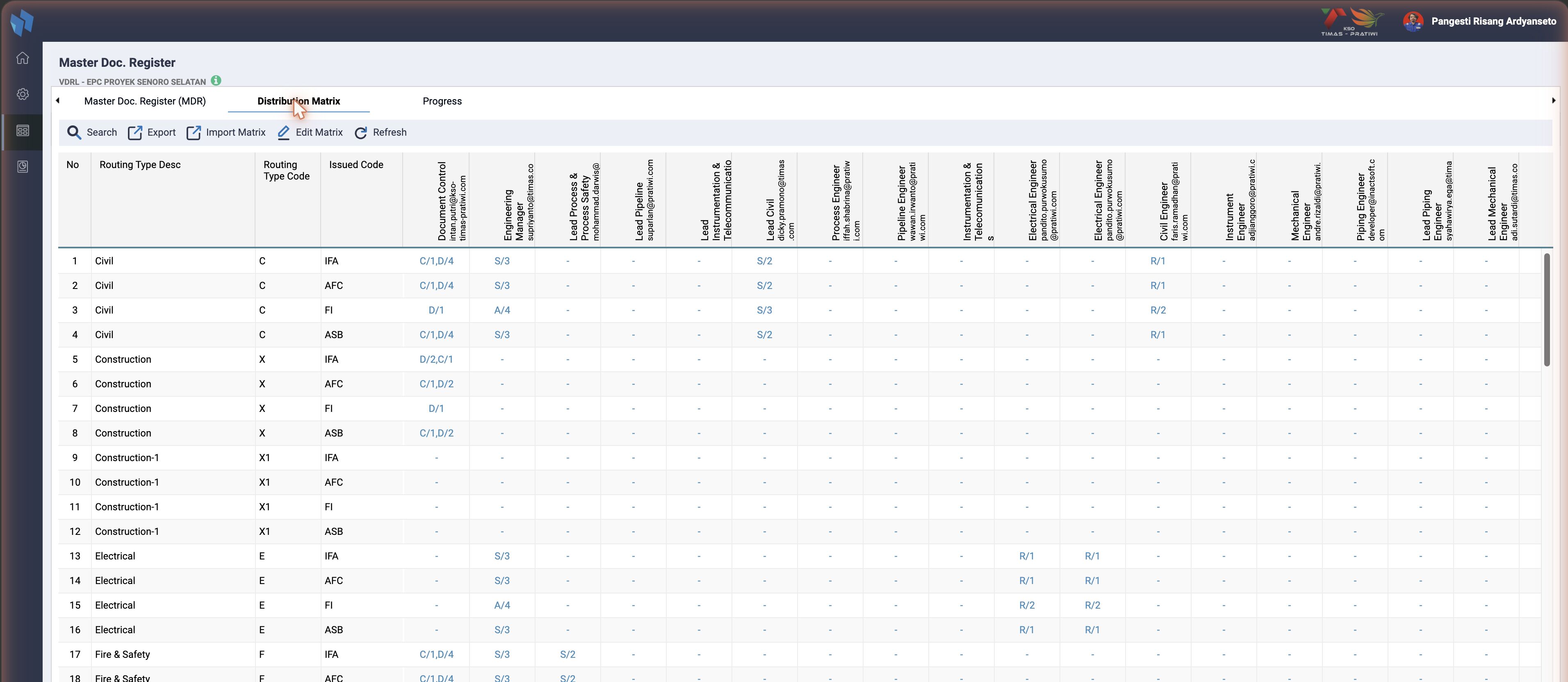
The matrix says who gets a document, with which action, in which sequence, and it is what the Upload) step turns into a routing. It is stored in ts_matrix_rout (matrix_project, matrix_rout_type, matrix_for_issued or matrix_transmission, matrix_doc_number, matrix_resource_id, matrix_rout_action, matrix_rout_sequence_no). The shape depends on the project's matrix type, ts_projects.matrix_type, set under Project Register:
| Matrix type | Rows | Used when |
|---|---|---|
issued_status | routing type × issued code | the review path differs per issue (IFR, IFA, AFC ...). The KTP screenshot |
transmission_type | routing type × transmission type | the path differs by how the document arrives |
doc_number | one row per document number | every document has its own path; Import Matrix is hidden for this type |
A cell reads action/sequence, and several entries stack with commas (C/1,D/4). The action letters are the Action Indicated codes: R Review, C Checking, S Responsible, D Transmit, A Approval and so on.
Edit Matrix (cmd=edit_matrix) opens the cell editor for the selected row, with Save, Delete, Close, Add and Clear Matrix. Import Matrix takes an Excel sheet; Export writes one. Both validate the same rules, in getErrorValidationImportMatrix():
- an
A - Approveris required and must be the last sequence; D - TransmitandA - Approvercannot share a sequence;- several
Dor severalAentries must sit on the same sequence.
Related
- Master Doc. Register: the screen overview.
- MDR and Progress: the other two tabs.