Document Routing
Module: routing, menu entry Document Routing under DMS. A routing is one document revision sent to a list of people in sequence, each with an action to perform. This screen is where those routings are created, received, answered and audited. Each tab has its own page (see the table below). The routing action codes are documented in Action Indicated on this page.
How this page was verified
Written from the master code on 2026-09-06, with the screens opened on inact-ktp.eris.place (KTP production snapshot, project VDRL, user Pangesti Risang Ardyanseto, a Document Controller). KTP's template is older and has no Ready to Return or Transmittal Out tab; the other six match master. Opening the New form created draft routing 7351 in that snapshot; it was deleted again from the Drafts tab.
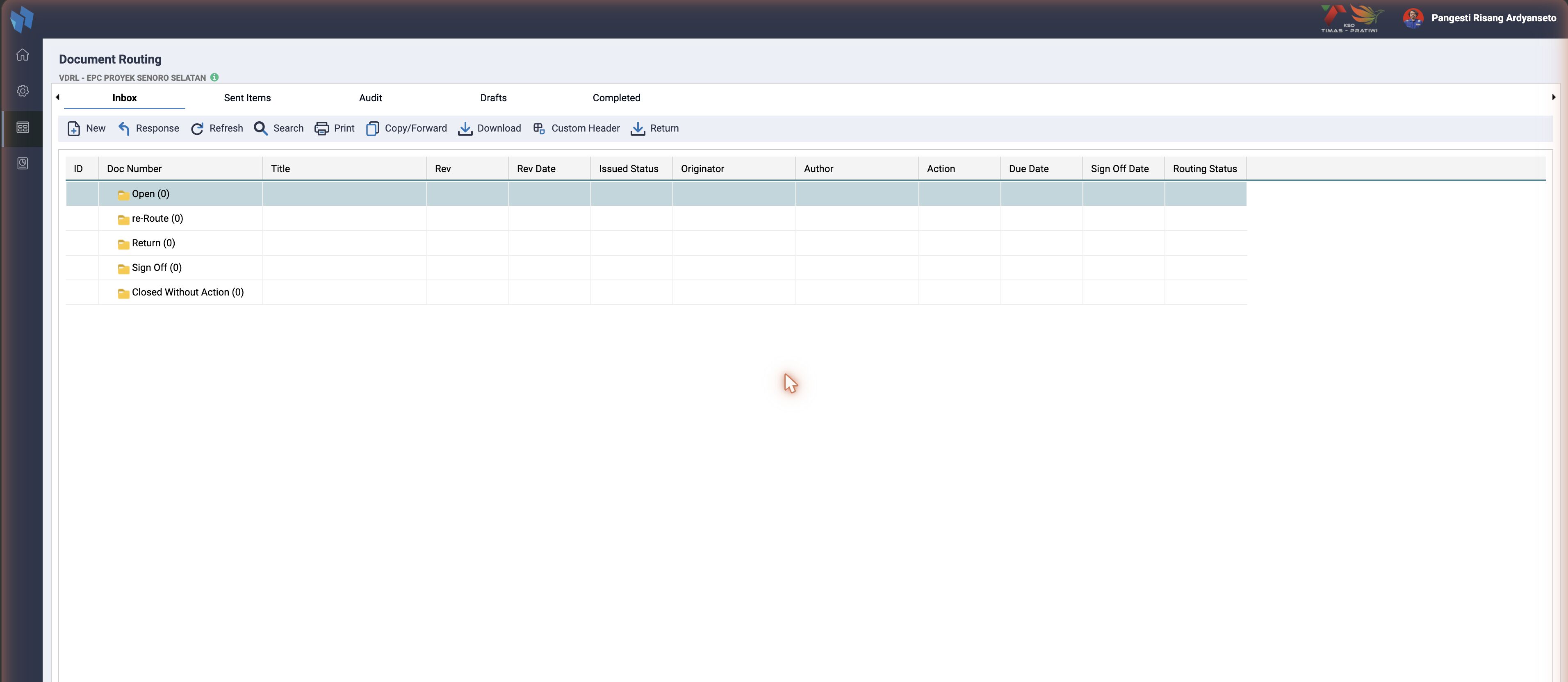
The tabs
routing_browse.htm declares eight tabs. Three are shown to everybody; the rest depend on the user's group, a privilege or a setting (routing_header.inc.php and the template's hideTab / showTab calls):
| Tab | What it lists | Query, from the handler | Who sees it |
|---|---|---|---|
| Inbox | routings where the user is a recipient and the routing is on their inbox | routing_handler_inbox.php: rout_have_send = 1 AND rout_is_oninbox = 1, rt.resource_id in the user's resources, current project. Grouped by Action Taken: Open, re-Route, Return, Sign Off, Closed Without Action | everybody |
| Sent Items | routings the user created and sent | routing_handler_outbox_audit_drafts.php, outbox: rout_author = me AND rout_have_send = 1. Grouped Open / Close | everybody |
| Audit | every sent routing of the project, whoever sent it | same file, audit: rout_have_send = 1 AND rout_is_oninbox = 1, project filter. Grouped by project, Open / Close, then by date | groups admin, Document Controller, Procurement Controll ($group_routing_auditor) |
| Ready to Return | routings whose approver has answered and that wait for the return transmittal | routing_handler_ready_to_return.php | enable_return_on_audit = 1 and the ready_to_return privilege on routing |
| Drafts | routings created but not yet submitted | drafts: rout_author = me AND rout_have_send = 0 | everybody |
| Comment Sheet | commented files attached to routings | routing_handler_commentsheet.php: ts_map_routing_file rows with rout_commented_by | the same three groups as Audit |
| Completed | routings that reached the end | routing_handler_completed.php. Grouped Approved / Rejected by the approver's response | everybody |
| Transmittal Out | files sent out in batch transmittals | routing_handler_transmittal_out.php: ts_transmittal_out_files | when batch_routing_enabled is on, or the consolidated routing view is on for the user |
The grid columns are the same across tabs, with small differences: Inbox shows Doc Number, Title, Rev, Rev Date, Issued Status, Originator, Author, Action, Due Date, Sign Off Date, Routing Status; Sent Items, Audit and Drafts show Author, Doc Number, Title, Rev, Rev Date, Issued Status, Originator, Return Code, Routing Status; Completed adds Closed By. Routing Status is the text of the current step ("Reviewer to Action", "Completed").
The Routing Slip
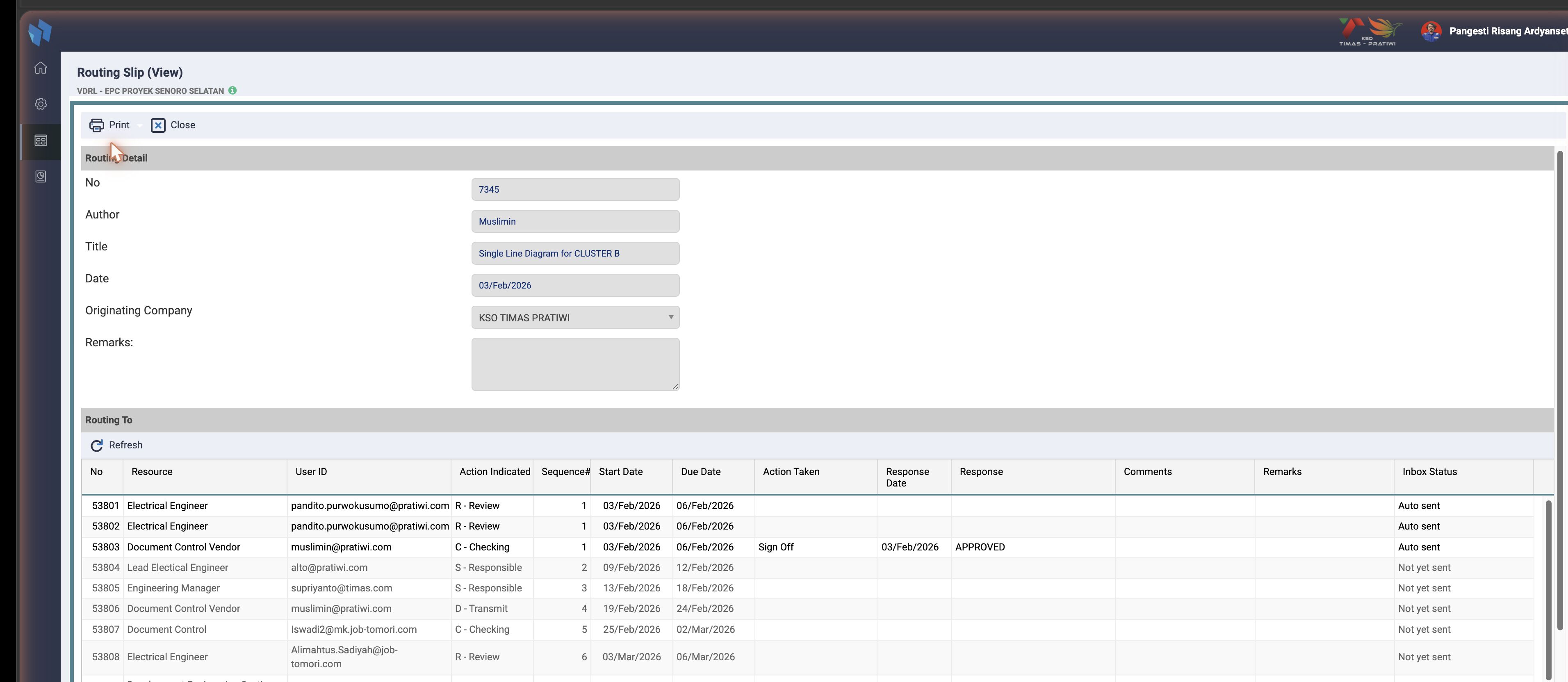
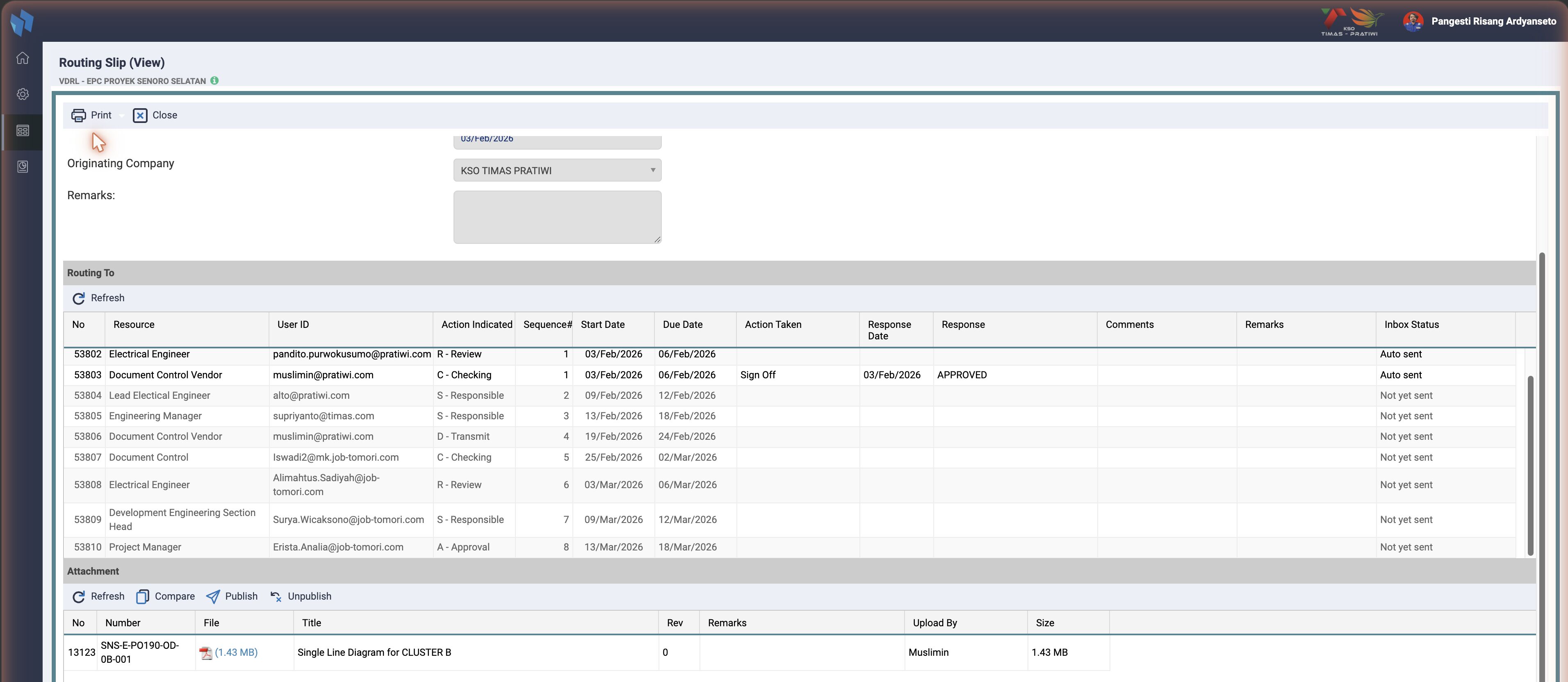
Every routing opens as a Routing Slip page in the same tab, in three sections. View (from Sent Items, Audit, Completed) is read-only; Edit and Response unlock the parts the user may change.
| Section | Content | Table |
|---|---|---|
| Routing Detail | No, Author, Title, Date, Originating Company, Routing Type, Remarks, Transmittal Ref; the invoicing block (Invoice No, Amount, Currency, dates, Status) when the routing type is an invoice | ts_routing |
| Routing To | one row per recipient: Resource, User ID, Action Indicated, Sequence#, Start Date, Due Date, Action Taken, Response Date, Response, Comments, Remarks, Inbox Status | ts_map_routing_to |
| Attachment | the routed revision (rout_type = 1) and any extra files: Number, File, Title, Rev, Remarks, Upload By, Size; Compare, Publish, Unpublish | ts_map_routing_file, ts_file_explorer |
Inbox Status is the sequence engine made visible: Auto sent means the row's sequence has been reached and the routing sits in that person's inbox; Not yet sent means an earlier sequence is still open. When the last person of a sequence signs off, the next sequence is sent (getRoutingToNextSequence), and the approver's sign-off closes the routing (rout_status = 'close').
Creating a routing
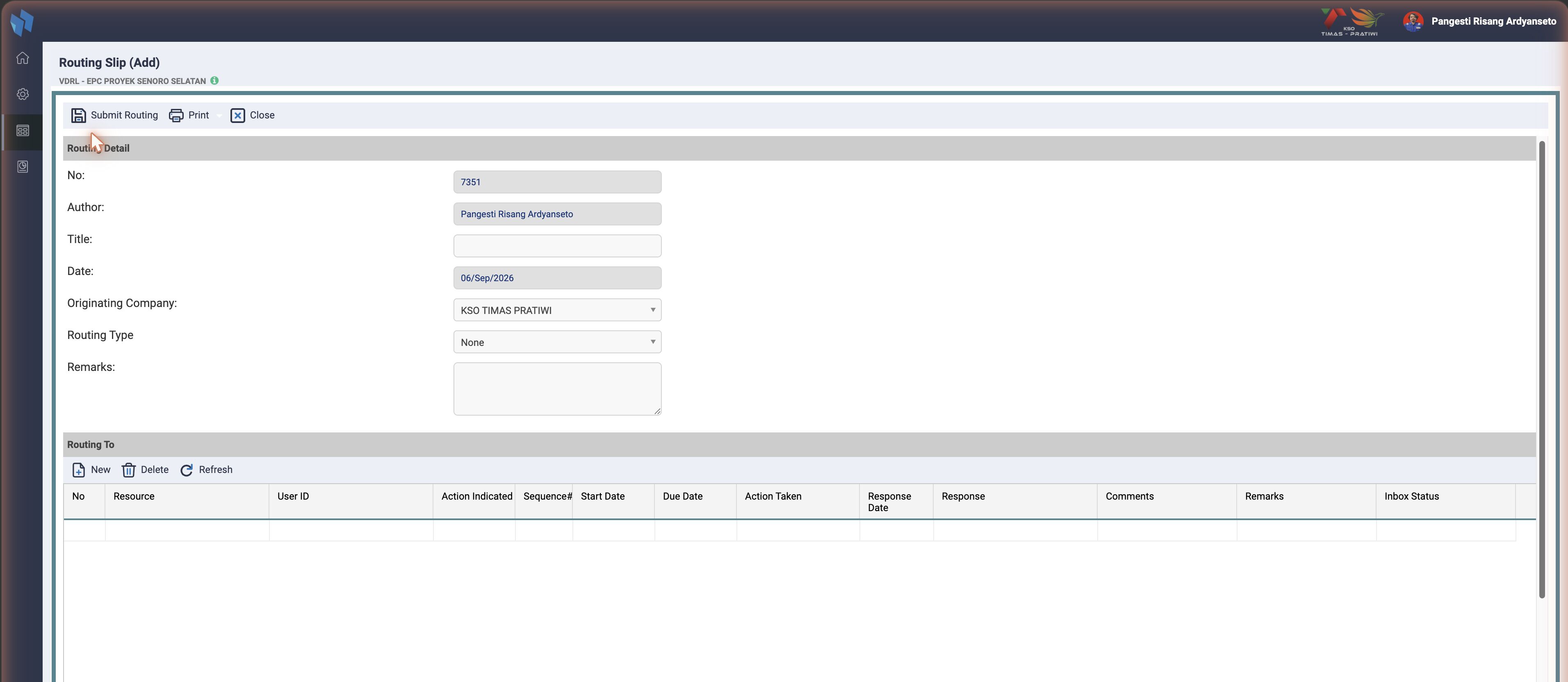
New on Inbox, Sent Items or Drafts opens routing_add.htm and immediately inserts a draft (rout_have_send = 0) with the next routing number. Filling the detail, adding recipients under Routing To (New, Delete, Refresh) and attachments, then Submit Routing sets rout_have_send = 1, marks the sequence 1 rows rout_is_oninbox = 1, and mails them. Close without submitting leaves the draft in the Drafts tab, where it can be edited or deleted.
Most routings are not created here. The Upload step of the MDR builds them from the Distribution Matrix, which is why a manual routing is the exception.
Action Indicated
What "Action Indicated" is
The Action Indicated is the role a recipient holds on a routing: what that person is asked to do with the document (Review, Approve, be informed, lead, and so on). It is the single most important per-recipient attribute. It drives which response fields show at sign-off, how the routing sequences and ends, which PDF annotations and stamps are allowed, and which notifications fire.
Every action has three identifiers, used in different places:
| Identifier | Example | Where used |
|---|---|---|
action_id (number) | 9 | ts_map_routing_to.rout_indicate, the recipient's action on a live routing |
action_matrix_type (one letter) | A | ts_matrix_rout.matrix_rout_action, the action assigned in the MDR matrix |
action_desc (label) | Approval | shown in the UI |
So the matrix stores the letter (for example A), while a recipient row stores the numeric action_id (for example '9'). Both resolve to the same ts_routing_action_indicated row.
Supported actions
getRoutingActionIndicatedList() in reference_function.inc.php only returns actions whose action_matrix_type is in $ACTION_CODE_FOR_ROUTING, a code constant in additional_global_variables.inc.php. In master, Jadestone, JOTRE and Timas it reads:
$ACTION_CODE_FOR_ROUTING = ["C", "S", "D", "R", "I", "A", "N"];Medco adds two codes
Medco's list is ["C", "S", "D", "R", "I", "A", "N", "L", "W"]. L (Leader) and W (Information Owner, action_id 17) are offered for routing there and nowhere else. See Instance differences.
The allowlist resolves to these supported values, in two families:
- Approval-type:
A,D,C,S, and in MedcoL. These can set a Result Code at sign-off, and because a Result Code can be an approve or a reject code, Approval-type actions can reject the document. That is the defining trait. - Non-approval:
R,I,N. These cannot set a Result Code, so they cannot reject. They record comments (R,I) or are only notified (N).
action_id | action_desc | matrix type | Family | rout_daysreview | Response field shown at sign-off |
|---|---|---|---|---|---|
| 9 | Approval | A | Approval-type | 0 | Return Code + Next Expected Submission |
| 12 | Transmit | D | Approval-type | — | Return Code² |
| 15 | Checking | C | Approval-type | — | Return Code |
| 16 | Responsible | S | Approval-type | — | Return Code |
| 11 | Leader | L | Approval-type | 1 | Return Code¹. Medco only in the allowlist. |
| 8 | Review | R | Non-approval | 5 | Comments / No Comments |
| 5 | Information | I | Non-approval | 0 | Comments / No Comments |
| 14 | Notify | N | Non-approval | 0 | no inbox response, see rules_action below |
Next Expected Submission is shown only for A (Approval). No other row lists it: D/C/S/L only ever get the Return Code. Within A there is one more gate: it is hidden for the non-owner side, so in practice it surfaces for the project owner's Approver. The full logic is under Sign Off, Next Expected bottom line).
¹ Leader uses the standard Return Code. In master and Medco L is folded into both approval blocks of the response form (routing_resp.htm), so a Leader sees the same Return Code field as the other Approval-type actions. There is no separate "Leader Return Code". The old #return_code_leader row wrote the same ts_map_routing_to.rout_result_code column with the identical option list. In Jadestone, JOTRE and Timas the orphaned return_code_leader row still sits in the template as dead markup.
² D (Transmit) is not just an approval row. It is the Document Consolidation (DocCon) checkpoint and behaves differently from the other Approval-type actions. See the D section.
The field-gating logic by matrix type is documented under Sign Off, Response fields by role).
Not supported, or legacy
These rows exist in ts_routing_action_indicated but are not in $ACTION_CODE_FOR_ROUTING, so they are not offered for routing:
O, Originator (id 13): has a matrix type but is excluded from the current allowlist. It was in the previous, commented-out list.L, Leader (id 11), everywhere except Medco. The sign-off code still handlesrout_indicate = 11, and the matrix import writes whatever letter the template holds, so a Leader row can still appear on a routing. It is just not offered by the list function.- No matrix type at all, legacy non-routing dispositions:
Action(1),File(2),See Me(3),Comments(4),Note And Return(6),Copy(7),Endorse(10).
Supported is not the same as in use
The allowlist is what the system allows. Which actions a project actually uses is data-driven by its MDR matrix template. In many installs the matrix only uses A (Approval) and L (Leader) from the Approval-type family, plus R and I. Check ts_matrix_rout.matrix_rout_action for your project.
D (Transmit) is the Document Consolidation (DocCon) checkpoint
D is the odd one out among the Approval-type actions. It is not really a reviewer role. It is a position in the routing chain: the Document Consolidation (DocCon) point that divides the internal side of the routing from the external side. Almost everything special about D follows from that. Several plausible-looking D paths are dead code and are called out below so nobody rediscovers them as features.
It defines the internal / external boundary
getPositionResourceMatrix() in routing.inc.php records the matrix index of the D row as doccon_postion and counts D rows as countDoccon. checkIsInternalApprover() then treats a responder as internal when their position is at or before doccon_postion and external when it is after. D itself sits at that position. This split drives which finalize branch a sign-off takes in routing_handler_post.php. Both functions exist in all of the big five.
It constrains matrix placement, enforced at upload
When a matrix contains a D, the live upload handler documents_master_multiupload_upload.php enforces:
Dmust be at or beforeA. ADsequenced after the Approver is rejected.- All
Drows on one sequence, allArows on one sequence. - The Approver is the final step. Nothing is sequenced past it.
No other action triggers a placement rule. A second copy of this rule lives in the matrix-edit-screen handlers, but those sit behind commented-out toolbar buttons. The live enforcement is the upload one.
Timas has no D rule at upload
The docconFound check does not exist in Timas's upload handler. The other four have it.
Its presence defers auto-publish
Also at upload: library consolidation and auto-publish run only if (!$docconFound). A D in the matrix means publishing waits for the consolidation step instead of happening at upload time.
On a normal sign-off it publishes the document plus an outgoing transmittal
In the live finalize path, when the D signs off and enable_autopublish = 1 and enable_transmittal = 1 and the routing is issued_matrix = 'external', the D branch in routing_handler_post.php:
- inserts the document into the register (
ts_documents), then - generates a
Transmittal("out"), the original / submission transmittal, and files it to the document (ts_map_doc_fileplusdoc_submission_number). It is published alongside the document.
The "in / out" naming is crossed. Read carefully before trusting a label.
The transmittal D produces is type "out", the submission. The external Approver's branch produces the type "in" copy, which is actually the return. Only "in" gets the (R) suffix, in routing_handler_transmittal.class.php. The destination columns are also crossed: the return ("in") writes ts_documents.outgoing_transmittal_no, while the submission ("out") writes ts_documents.doc_submission_number. Even the submission number string ends in a literal -IN. So a transmittal that looks incoming in the data may well be D's outgoing one. In code terms: D = outgoing / submission; the Approver = the (R) return.
Batch routing changes how D responds
Everything above is non-batch behaviour, where D signs off through the normal Response dialog with its Return Code and no Next Expected. In a batch-routing project (ts_projects.batch_routing = 1) on an external routing, D is pulled out of normal sign-off into the dedicated External Transmission flow: the transmit_dc inbox button and a redirect in js/routing.js. Its rows are auto-signed by setAutoDCSignoff() in routing.inc.php. See Sign Off) for the two modes side by side.
Dead D code. Do not rediscover these as features.
- Server-side
dccrole and stamp enforcement.$rulesPersonAs = 'dcc'inrouting.phpand therout_indicate == 12stamp-mandatory check next to it are computed, but their consumers are entirely commented out. Nothing enforces them. - Two older transmittal blocks in
routing_handler_post.phpare insideif (false), so dead. The live transmittal generation is theDand external-Approver pair above. All five forks carry threeif (false)blocks in this file.
Per-action behaviour rules: rules_action
Not relied upon. Effectively not working for now.
The rules_action blob is read client-side, but the server-side enforcement is not wired up. The code that would act on it (the dcc and role checks and the stamp-mandatory checks in routing.php) is commented out, and L (Leader) has rules_action = NULL entirely. Treat the table below as design intent, not guaranteed runtime behaviour.
Each supported action carries a rules_action JSON blob that declares how that action behaves. v2 had no such column. It is read by getActionRules.php and getUserLevel.php, and seeded by DefaultTsRoutingActionIndicated.php. Medco additionally carries a one-off script, migrations/scripts/MIG-013_routing_action_rules.php, that the other forks do not have.
The JSON has three areas:
pdf_viewer: which annotations and stamps the role may use, and create / edit / delete / update permissions in the PDF viewer.notification: which emails fire (rejected,doc_con_issued,doc_return).routing: the workflow rules below, plus per-outcome (approved / rejected) allowed and disallowed stamp lists.
Key routing.* flags by action, from the seed:
| Action | received_in_inbox | bypass_on_overdue | end_routing | return_code |
|---|---|---|---|---|
| Approval (A) | yes | yes | yes | yes |
| Transmit (D) | yes | — | yes | — |
| Checking (C) | yes | yes | yes | — |
| Responsible (S) | yes | — | yes | — |
| Review (R) | yes | — | — | yes |
| Information (I) | yes | yes | — | — |
| Notify (N) | no | — | — | — |
| Leader (L) | rules_action is NULL |
What they mean:
received_in_inbox: whether the action lands in the recipient's inbox. Notify (N) isfalse, so it notifies without creating an inbox task.bypass_on_overdue: the recipient can be auto-bypassed when overdue.end_routing: completing this action can finish the routing (theA/D/C/SApproval-type actions).return_code: a return or result code applies. The JSON flags Approval and Review; the form renders a result-code input for all Approval-type actions but not forRorI. A small JSON-versus-form discrepancy.
Where Action Indicated is consumed
- MDR matrix / Upload: the matrix import writes
matrix_rout_action(letter) per resource. Upload turns the matrix into per-recipientts_map_routing_torows, ordering sequences partly by action. See Upload. - Sign Off:
rout_indicate(action_id) drives the per-role behaviour and the response-form field gating. Full breakdown under Sign Off, Behaviour by Action Indicated). - PDF viewer:
rules_action.pdf_viewerwould control allowed annotations and stamps, but server-side enforcement is commented out. Treat as design intent. - Notifications:
rules_action.notificationdeclares which emails fire, but is part of the same not-enforced subsystem.
Database tables
| Table | Column | Holds |
|---|---|---|
ts_routing_action_indicated | action_id, action_desc, action_matrix_type, rout_daysreview, rules_action | the reference definitions |
ts_matrix_rout | matrix_rout_action | the action letter assigned in the MDR matrix |
ts_map_routing_to | rout_indicate | the recipient's action_id on a live routing |
There are _corr variants (ts_routing_action_indicated_corr, and a char(1) rout_indicate in ts_map_routing_to_corr) used by the correspondence routing flow. The main document routing uses the tables above.
Gotchas and known issues
- Three identifiers for one action (id / letter / label). The matrix uses the letter, recipient rows use the id. Mixing them up is an easy mistake.
- Supported (allowlist), in use (matrix data) and defined (table) are three different sets.
O(Originator) is defined but not in the routing allowlist.L(Leader) has norules_actionJSON, and outside Medco it is not in the allowlist either.D(Transmit) is not a normal approval row. It is the Document Consolidation checkpoint with placement rules, publish deferral, transmittal generation and a batch-routing-only flow. Treating it as just another Approval-type action will mislead you.- The allowlist is a code constant, not a database or admin setting. Changing the supported set is a code change.
Instance differences (Action Indicated)
Checked on 2026-09-06.
| Instance | Difference |
|---|---|
| Medco | $ACTION_CODE_FOR_ROUTING adds L (Leader) and W (Information Owner, action_id 17, with its own rules_action). The response form has an extra Information Owner branch keyed on resp_is_terminal. Carries the migrations/scripts/MIG-013_routing_action_rules.php one-off. |
| Jadestone | Response form still keys field gating on the matrix type like master, but keeps the dead return_code_leader row in the template. |
| JOTRE | Response form gates fields by the action label (`a == 'Approval' |
| Timas | Same form as JOTRE. No docconFound rule at upload, so the D placement constraints and the publish deferral do not exist there. |
Master and Jadestone match on the allowlist, the seed and the D mechanics.
Gotchas
- Audit and Comment Sheet are group-gated by name, not by privilege: the group must be called
admin,Document ControllerorProcurement Controll(sic). A Document Controller group under another name never sees Audit. - New creates a row before anything is typed. Closing the form leaves a draft behind; users who click New to look end up with empty drafts.
- Inbox is per resource, not per person. A person with two resources sees both; a person with no resource sees nothing.
- Sent Items and Audit hide routings that left every inbox (
rout_is_oninbox = 1in both queries), which is the same rule the MDR Report uses. - Tab visibility is decided at page load. Turning
enable_return_on_auditon needs a reload to show Ready to Return.
Instance differences
Checked on 2026-09-06.
| Instance | Difference |
|---|---|
| KTP | Template without the Ready to Return and Transmittal Out tabs; Comment Sheet exists but its group does not see it. |
| JOTRE, Timas | No Return button; the label-based response form and the approver-finalize rule described on Return). |
| Medco | The Comment Summary report, the W action and the multi-process rework described on Sign Off). |
| Jadestone | As master. |
Related
- Action Indicated: the routing action codes.
- Master Doc. Register: where routings come from.
- Routing Overdue: the report over
ts_map_routing_to.