MDR
The first tab of Master Doc. Register: the register grid, its toolbar, and the buttons that move documents (Import MDR, Upload, Upload Transmittal, Generate Transmittal).
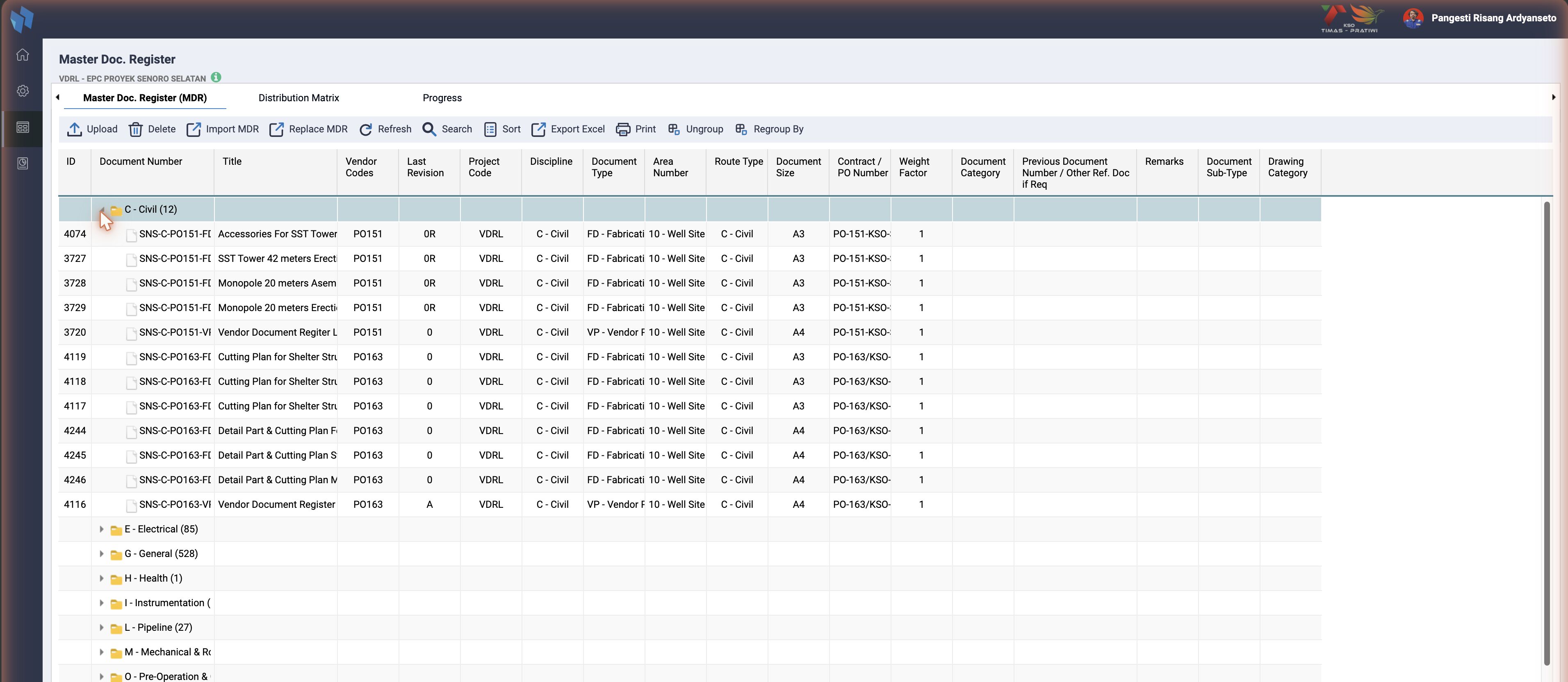
One row per ts_documents_master entry, grouped by discipline by default. The columns are the project's MDR template (getProjectSelectedColumn, maintained under Project Register), which is why two instances show different column sets. The KTP project shows ID, Document Number, Title, Vendor Codes, Last Revision, Project Code, Discipline, Document Type, Area Number, Route Type, Document Size, Contract / PO Number, Weight Factor, Document Category, Previous Document Number, Remarks, Document Sub-Type and Drawing Category.
| Button | What it opens | Where it is described |
|---|---|---|
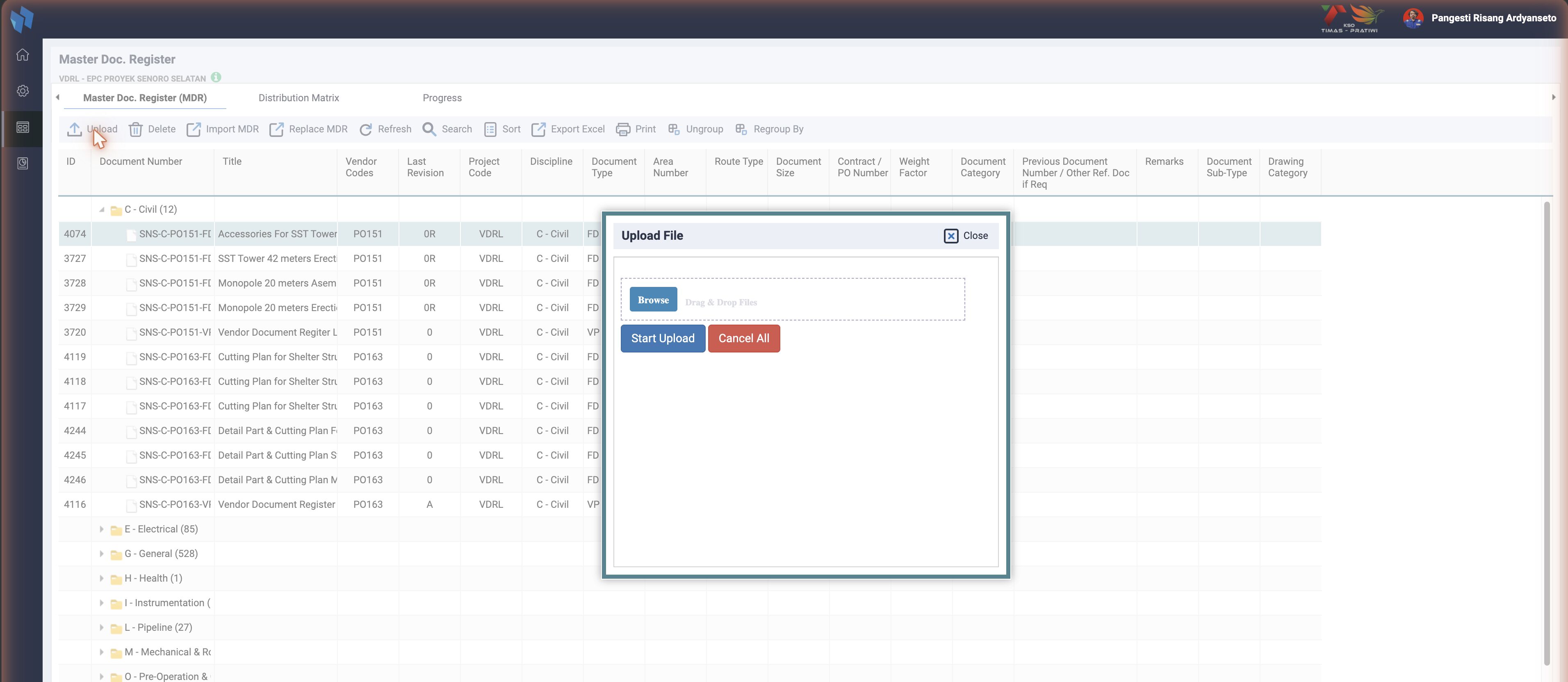
| Upload | the Upload File dialog: pick files, then the upload option step matches each file to an MDR row and creates the library revision and the routing | Upload) |
| Delete | removes the selected MDR rows, their matrix rows and their ts_mdr_progress row | admin only |
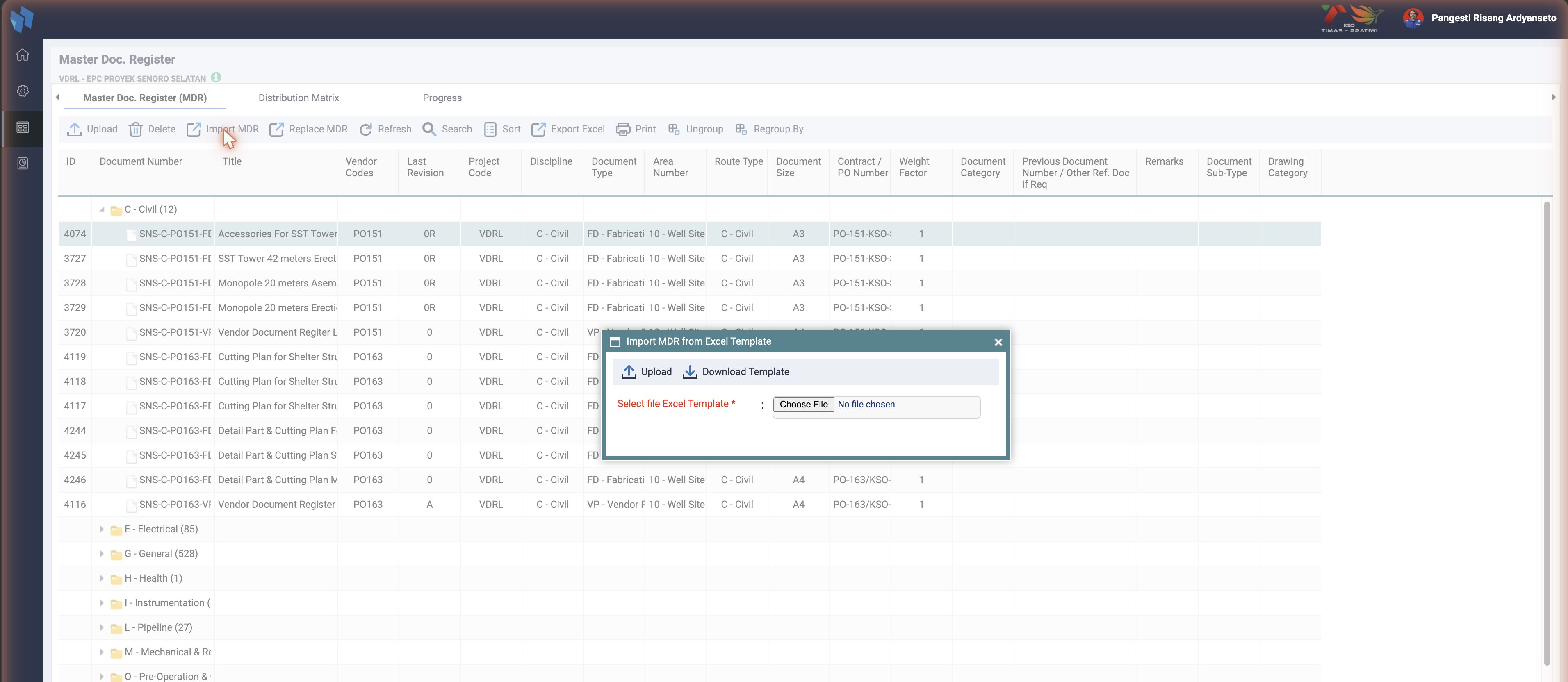
| Import MDR | the Import MDR from Excel Template dialog: download the template, upload the filled one | Import MDR) |
| Replace MDR | the same dialog in replace mode: rows that exist are updated, not duplicated | Import MDR) |
| Upload Transmittal | the return flow of the audit-based instances | Upload Transmittal) |
| Search | the Search MDR Data dialog, basic and advanced | below |
| Sort | a sort dialog on the template columns | |
| Export Excel | cmd=exportXLS, the grid as a workbook | |
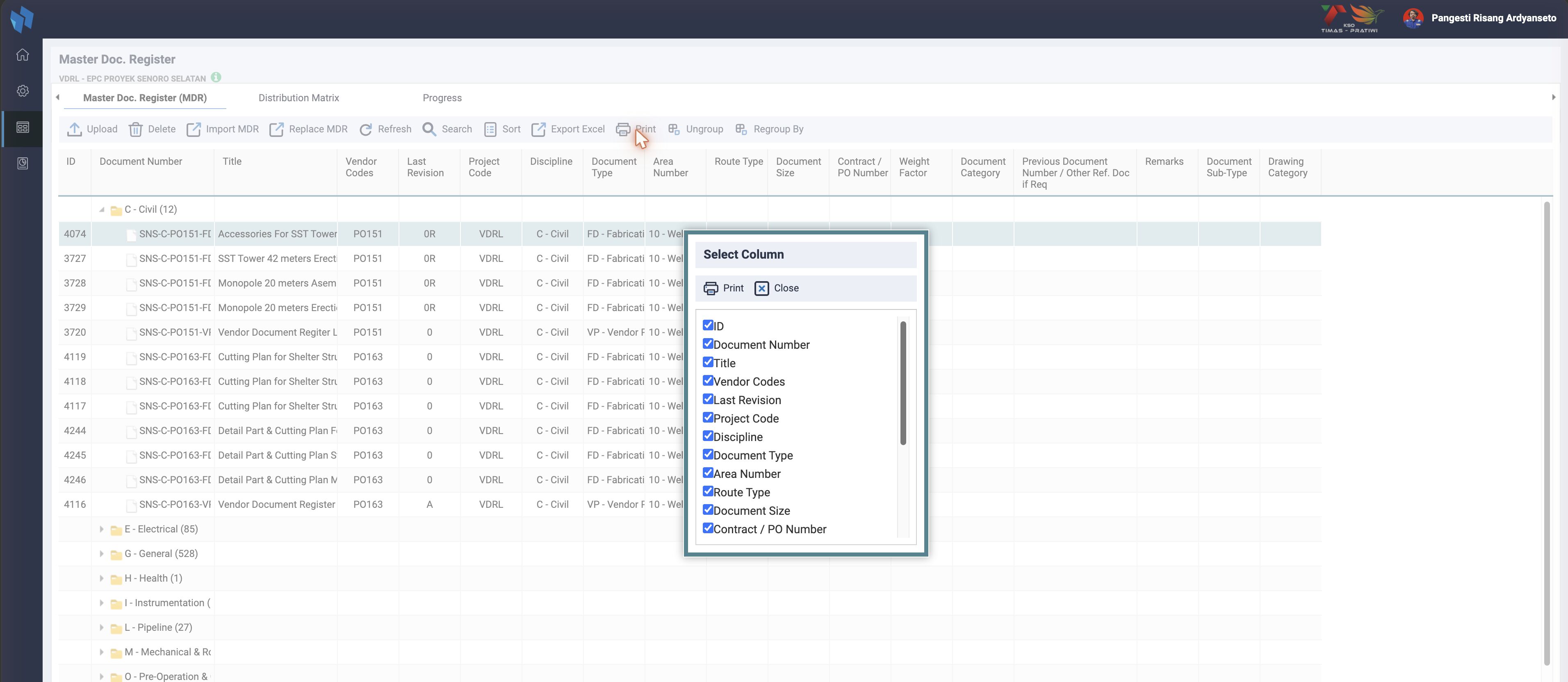
the Select Column dialog, then the grid printed with the ticked columns (cmd=printgrid) | ||
| Ungroup, Regroup By | cmd=regroup: change the grouping | below |
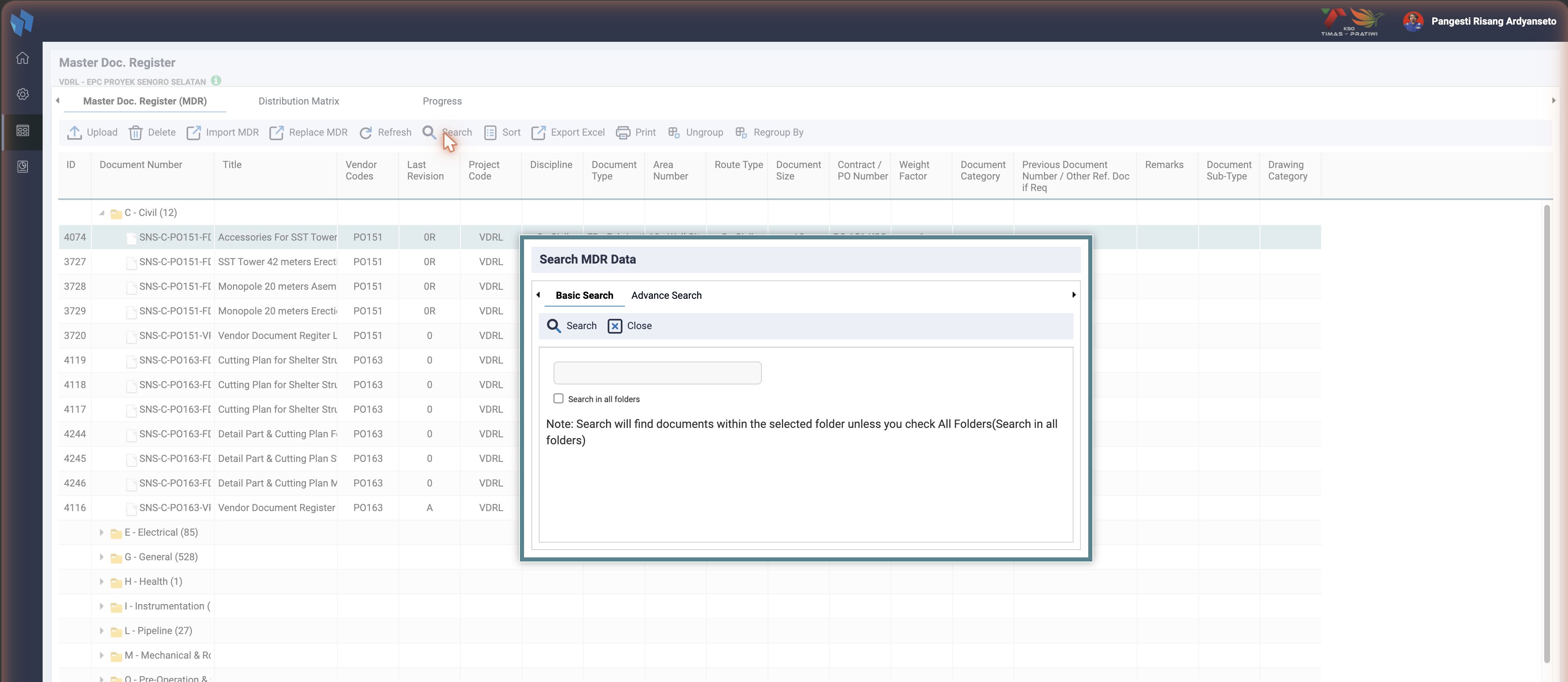
Search
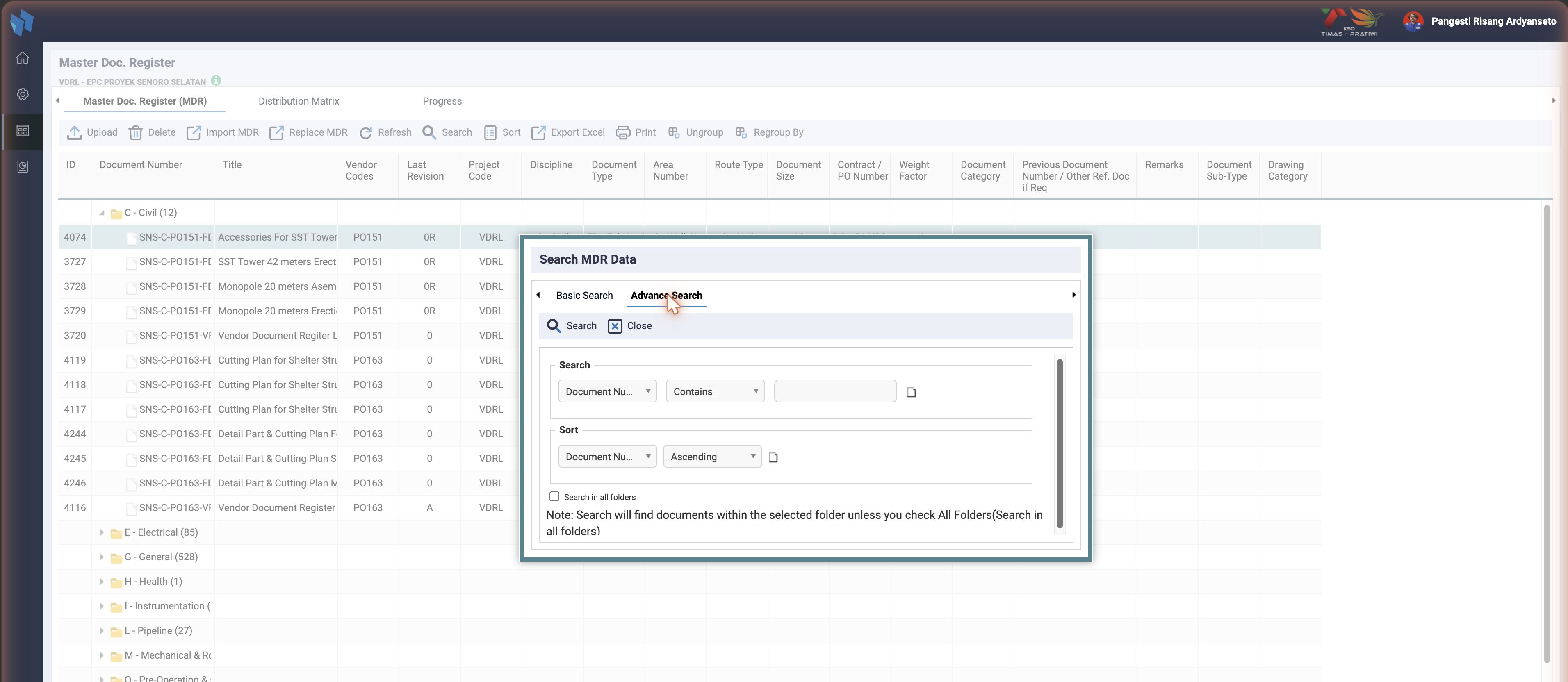
cmd=search opens documents_master_search.htm with two tabs. Basic Search is one text box matched against the document number and title of the current folder, or of every folder when Search in all folders is ticked. Advance Search is the usual field / operator / value rows on the template columns, plus a sort. The result replaces the grid until Refresh.
Print and Regroup
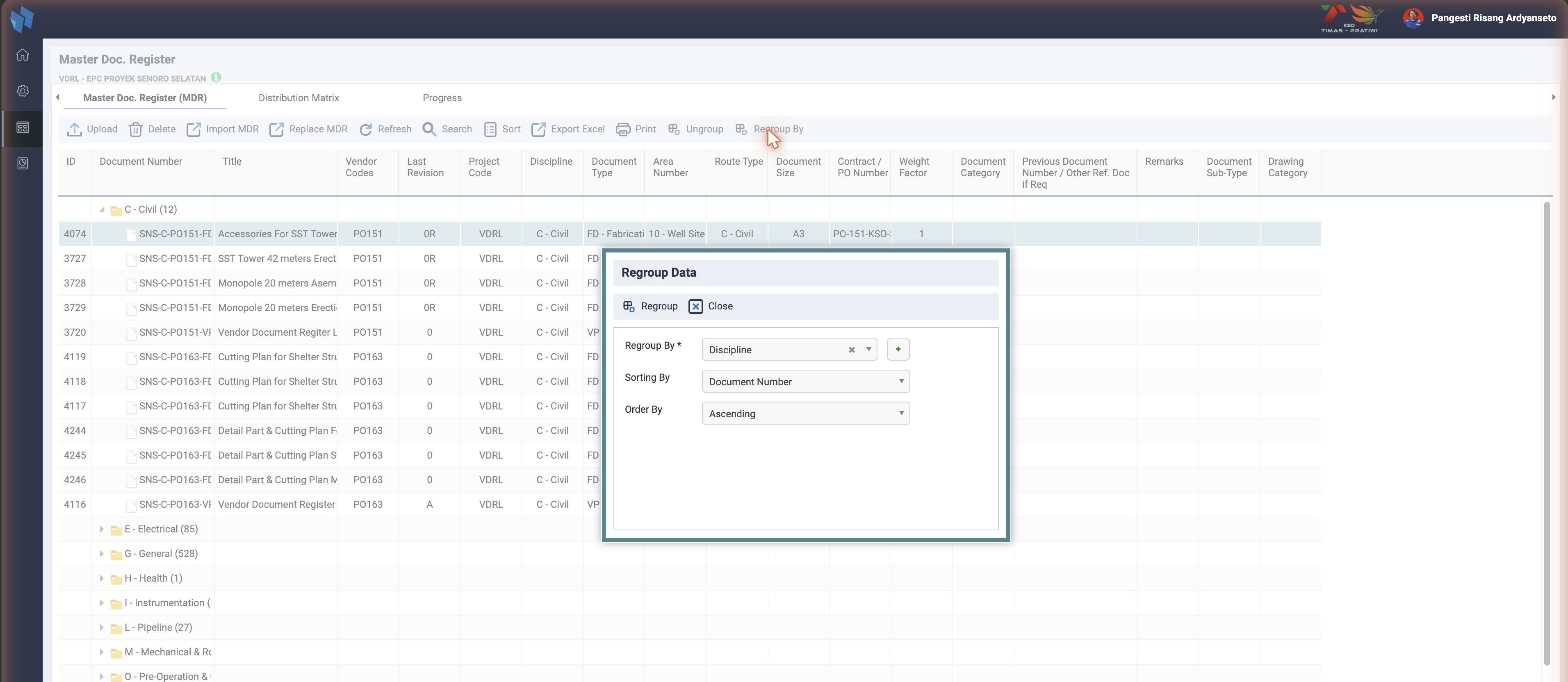
The Regroup By list is Discipline, Document Type and the columns the instance has switched on: enable_doc_category, enable_system_code, enable_doc_classification, enable_func_code and enable_contract_po_number each add one (cmd=getRegroupOption). The choice is saved per user and project in ts_grouping_parameter, so the grid opens the same way next time.
Import MDR
Overview
Import MDR bulk-creates the MDR planning grid (ts_documents_master) and the routing matrix (ts_matrix_rout) from an Excel (.xlsx) file. It is a two-phase staged import with a red-cell preview, on $pdo, and in most forks it supports several matrix types.
Where it sits in the workflow
Import MDR (this)  → ts_documents_master (grid) + ts_matrix_rout (matrix)
   ↓
Upload (file)      → ts_documents (register) + ts_routing            ← see Upload
   ↓
Upload Transmittal → stamps submission no. onto register / routing   ← see Upload Transmittal
User flow
- Documents Master, Import MDR (
import_act, edit privilege). - Choose MDR or VDR (
dm_is_vdr), pick the.xlsx, Upload. - A preview grid shows. Invalid cells are highlighted red and block the commit until fixed.
- Confirm to commit the rows into the MDR.
How it works
- Phase 1, stage and parse:
act=importexcelindocuments_master_handler_post.phpcallsproceedTempMDRImport(), thensaveTemporaryDocs()indocuments_master.inc.php. It reads the file with PhpSpreadsheet, takes the first data row fromts_projects.mdr_row_as_value_start, resolves the column-to-field mapping fromts_mdr_template_settingjoined withts_mdr_column, and stages each row plus its matrix as JSON intots_docmaster_metadata_temp. - Phase 2, validate (preview): duplicate document numbers, date format (
dd-Mon-yy), plan date format (dd-mm-yyyy), originator ints_company, sub-discipline and discipline combination. - Phase 3, commit:
proceedSaveTempdata()callsinsertMetadataToDocumentsMaster(), which writests_documents_masterthrough theMdrmodel (model/mdr.php), andinsertMatrixData()writests_matrix_rout.
Both staging functions and the Mdr model exist in all five forks.
Data and template contract
Column layout is data-driven per project, not hard-coded: mdr_row_as_value_start plus ts_mdr_template_setting and ts_mdr_column define which Excel column maps to which ts_documents_master field, and where the user-matrix block begins. Matrix action codes map to sequences in insertMatrixData(): R → sequence 1, L → sequence 2, A → sequence 3, anything else → 4.
Sheet order is metadata columns, then the User Matrix block (doc_number type only), then Plan Date columns.
Matrix types
getProjectMdrMatrixType() reads the project's matrix type: doc_number, issued_status or transmission_type. Master, Jadestone, Medco and JOTRE have it. Timas does not; it knows a single matrix type.
Plan Date columns (INA01-809, master only)
The template carries one Plan Date <ISSUED_CODE> column per row in ts_issued_status for the project, second header line DD-MM-YYYY, written after the User Matrix block by mdrSettingDownload(). Import stores the value in ts_mdr_progress.progress_content at ['two'][<issued_code>]['plan_date'] as Y-m-d, the same field Edit Progress writes. Written and read for every matrix type: the plan date is per Issued Status and has nothing to do with the matrix type.
- Located by header text, never by counting columns.
saveTemporaryDocs()matches row 1 againstPlan Date <code>and accepts only codes the project actually has, then stages each value under aplan_date_<ISSUED_CODE>key intemp_data. Metadata stays keyed by column letter. Both the preview grid and the commit read them back by code viaextractPlanDatesFromTempData(). - Why not a column count. Counting back from the last column breaks when the file was downloaded before an Issued Status was added or removed. Counting forward with
count(get_doc_column_master2()) - 1breaks because that function filtersts_mdr_template_setting.is_import = 1while the template writer (mdrSettingList()) does not. On the INA01 dev data that is a two-column error. - An empty cell imports fine and stores an empty plan date. A file with no Plan Date columns leaves anything already stored untouched, so older template files still import unchanged.
- The format check happens at
cmd=temporaryMetadataValidation(d-m-Y), reported in theinvalidDateCellList2bucket. That bucket's branch order intemplates/tracking_v2/documents_master_browse.htmmust match the branch order that picks$data["msg"], or the red cells and the message disagree.
Only master has this
extractPlanDatesFromTempData() exists in master alone. The other four forks import no plan dates from the MDR template.
Database tables affected
| Table | Operation | Notes |
|---|---|---|
ts_docmaster_metadata_temp | insert / select / delete | staging (row plus matrix as JSON) |
ts_documents_master | insert (via Mdr) | one row per spreadsheet row; dm_is_vdr from the option |
ts_matrix_rout | insert | reviewer matrix per document |
ts_mdr_progress | insert / update | weight factor plus plan date per Issued Status (plan date: master only) |
ts_projects, ts_mdr_template_setting, ts_mdr_column | select | row start plus column mapping |
ts_issued_status, ts_progress_gate | select | Plan Date columns plus progress skeleton |
ts_company, ts_sub_discipline, ts_docdiscipline, ts_org_person | select | validation plus reviewer lookup |
Gotchas and known issues
- Layout is data-driven. A wrong
mdr_row_as_value_startor mapping silently reads headers as data. Start from the project-specific template. - Reviewer-name lookups fail silently. An unresolved matrix name yields an empty
person_idand that matrix entry is skipped, leaving routing gaps that only Upload) surfaces later. - One staged import per user and project. Starting a new import overwrites an unconfirmed one.
- The User Matrix block must end at its merged header, not at
getHighestColumn(), because the sheet no longer ends with the matrix.saveTemporaryDocs()reads the end of the merge forUser Matrixand keeps only the column letter. Using the raw cell address (CE1) leaves the row digit in the per-row range, soCE1.4becomesCE14and the read spans thousands of rows instead of one. That is INA27-236, a 504 on a 2,600-row file. A small file looks fine either way, so only a large file catches it.
Instance differences (Import MDR)
Checked on 2026-09-06.
| Instance | Difference |
|---|---|
| Timas | No getProjectMdrMatrixType(); single matrix type only. |
| Jadestone, Medco, JOTRE, Timas | No Plan Date columns in the template and no extractPlanDatesFromTempData(). |
Upload
Overview
Upload ingests document files, creates the register row (ts_documents) for a PDF, stores the file, and kicks off routing from the project's matrix. The engine is on $pdo, with feature-flag gating and DMS-reference auto-mapping. The UI is simple: the old options dialog (Convert / Modify Routing / Force Upload) is gone in master, and PDF watermarking is disabled. It also carries two known bugs forward, see Gotchas.
Prerequisites
1. Import MDR / Add   → ts_documents_master (planning grid)     ← Import MDR
2. Upload (this)      → ts_documents (register) + ts_routing    ← creates + routes
3. Upload Transmittal → stamps submission no. onto those rows
The document number must exist in ts_documents_master, and the routing matrix ts_matrix_rout must be populated. Upload rejects the file otherwise ("User matrix empty").
User flow (master)
- Documents Master, Upload (
upload_act, theuploadprivilege). - The Upload File window opens directly. Pick an Issued Status (hidden if the project's filename scheme has no
issued_code), add files in the multi-file uploader, Start Upload. - A confirmation prompt asks "Whether originator of document is correct?" before the file goes up.
- Each file is validated, stored, and, for PDFs, registered and routed. Results return as JSON per file.
Filename matters. Document number, revision and title are parsed from the filename per ts_file_name_setting. An unmatched number or a malformed name is rejected.
What was simplified or removed
In master's documents_master_browse.htm the upload_act button calls multiuploadOptionProcess() straight away; the line that opened the old dialog, // multiuploadOption();, is commented out. So the three v2 choices are no longer offered:
| Old option | What it did | Status in master |
|---|---|---|
Convert Document(s) (valConvert) | Ran pdf_converter.php to detect oversize PDF pages, queued them in ts_routconvert_queue, and held the doc out of inboxes until converted. | Not selectable. The handler still has if ($_GET['valConvert']==1) include "pdf_converter.php", but the parameter is never sent, so Convert is dead code. |
Modify Routing(s) (valModify) | Staged the new routing into ts_routmaster_temp so the uploader could review it before notification emails went out. | Not selectable. The upload_routing and modify_routing_process toolbar buttons inside showUpload are commented out. Routing follows the "send now" path. |
Force Upload (forceStatus) | Skipped the next-expected-submission and previous-revision-returned guards for out-of-sequence uploads. | Not selectable as a toggle. The next-expected guard is governed by the enable_next_issue_code config flag instead. |
Also removed: watermarking of SPRD / VOID PDFs. The routine that stamped superseded or void PDFs with their issued description on upload has no live line left in the handler in any of the five forks. An enable_watermark flag exists in the seed of master, Jadestone, Medco and JOTRE, default 0, and the upload handler does not read it.
Medco brought the dialog back, with one option
INA28-229 (2026-07-12) re-activated the Upload Option dialog in Medco with Force Upload only. upload_act there runs checkPerms('upload', multiuploadOption), and multiuploadOptionProcess() calls showUpload(0, 0, 0, valForce). Convert and Modify Routing stay unavailable.
Jadestone asks no originator question
Its upload form sets showOriginator: false with the note "originator is not asked per file anymore, it is always the logged in user". The other four forks show the prompt.
How it works
The handler documents_master_multiupload_upload.php validates the filename, looks up the MDR row, checks the matrix, inserts ts_documents, stores the file (ts_file_explorer, ts_map_documents_library, ts_map_doc_file), and creates routing (ts_routing, ts_map_routing_file, ts_map_routing_to) with due dates. Issued Status drives review durations, the next-expected-submission check, and the issued metadata stored on the records. DMS reference values are copied into ts_map_routing_file through MODULE_REFERENCE_TABLE_CONFIG and getAllDmsRefDataByRelatedTable() in tracking_function.inc.php, in all five forks.
Library folder: Deliverables only at upload
In v2, Upload auto-derived a nested library folder from the document's MDR metadata via getLibCodeAutoGenerateFromDocMaster(), shaped by ts_projects.project_east_java (Medco / Ophir / East Java hierarchies).
Upload does not do that any more. The function is no longer referenced from the upload handler at all, in any of the five forks. Instead the uploaded document is filed into a single fixed folder, the project's Deliverables folder, via getLibCodeDeliverablesByProjectCode(). The MDR-metadata nested placement happens later, at routing auto-publish (approver sign-off), not at upload. See Auto Folder Creation and Sign Off.
Timas files differently
Timas's upload handler has no getLibCodeDeliverablesByProjectCode() and no enable_autopublish read. It resolves the project folder from ts_doc_library directly. Read the handler before assuming the Deliverables behaviour there.
The D placement rule
When the matrix contains a D (Transmit / DocCon) row, the handler enforces its placement and defers auto-publish. Details under Action Indicated. Timas has no docconFound check.
Database tables affected
| Table | Operation |
|---|---|
ts_documents_master | select, update (dm_revision) |
ts_documents | insert (PDF), update (doc_due_date) |
ts_file_explorer, ts_map_documents_library, ts_map_doc_file | insert |
ts_matrix_rout | select (matrix) |
ts_routing, ts_map_routing_file, ts_map_routing_to | insert |
Gotchas and known issues
- Hard-coded
matrix_doc_no='4'. Still present in all five forks. The action-count query filtersWHERE tmr.matrix_doc_no='4', a literal, so it always counts document number 4's matrix actions, not the uploaded document's. - Hard-coded
is_trash='y'. Still present in all five forks. Thets_map_routing_fileinserts bind$is_trash="y", flagging every routing-file link as trash. - Matrix must exist or upload fails. Run Import MDR) first.
- Rollback is manual, not transactional. A mid-way error can leave orphans.
- Dead code that looks like features. Convert and Modify Routing still have backend code but nothing sends their parameters.
cron/cron_issue_staging_oversize.phpexists but is a file-size notification job. It is not a replacement for the removed Convert step.
Instance differences (Upload)
Checked on 2026-09-06.
| Instance | Difference |
|---|---|
| Medco | Upload Option dialog re-activated with Force Upload only (INA28-229). forceStatus is read twice in the handler. |
| Jadestone | No originator confirmation prompt. The originator is always the logged-in user. |
| Timas | No docconFound rule, no getLibCodeDeliverablesByProjectCode(), no enable_autopublish read in the upload handler. |
| JOTRE | Matches master on every item checked. |
Upload Transmittal
Overview
Upload Transmittal imports a filled Transmittal Sheet (.xlsx) and stamps matching register documents with a submission number and a previous-document reference. The layout contract and cell positions are the ones INACT has always used. In master the importer is on $pdo, checks the file type, and no longer updates routing remarks.
It is not a generic importer: it only updates existing ts_documents rows, matched on exact doc_number plus doc_rev.
Prerequisites and order
1. Import MDR / Add   → ts_documents_master
2. Upload (file)      → ts_documents (register) + ts_routing
3. Upload Transmittal → stamps submission no. / prev-doc onto those rows
Uploading a transmittal before step 2 matches zero rows.
User flow
- Documents Master, Upload Transmittal (
import_transmittal_act, edit privilege). - Pick the filled Transmittal Sheet
.xlsx, Save. - On success the server responds
Success.; a duplicate name respondsTransmittal <name> already exist.
How it works
The act=importtransmittal handler in documents_master_handler_post.php:
- File type check. A non-Excel file is refused with "Invalid file type. Please upload an Excel file."
- Duplicate check. The filename without extension is compared with
ts_correspondence.corr_doc_number. - Save the file.
uploadTransmittal()writes it todocUpload/correspondence/. - Parse the Excel with PHPExcel, the legacy library. First sheet to array.
- Read the header cells. H9 transmittal number, H7 contract, B7 from-company.
- Insert
ts_correspondence(corrkind_id=1).library_codeis looked up from the incoming-transmittal default folder rather than the old hard-coded1.1. - Record the file.
ts_file_explorer,ts_map_corr_file. - Loop document rows from row 25, stopping at the first empty column A. For each row, update
ts_documents(doc_submission_number,doc_number_prev)WHERE doc_number=<A> AND doc_rev=<F>. In master, Jadestone and Medco the old update ofts_routing.rout_remarksis commented out. - Resolve the sender.
ts_company.company_desc LIKE '%<from>%'.
Data and template contract
| Cell | Meaning |
|---|---|
| H9 | Transmittal Number |
| H7 | Contract Number |
| B7 | From, the sender company |
Document table: header row 24, data from row 25. A = Document Number, F = Rev, N = previous document (doc_number_prev), P = Remarks.
What happens to an unmatched row
In master, the per-row UPDATE is a prepared statement and the import aborts with "Failed to map transmittal file5." only when the statement fails. A row that matches zero documents passes silently. Medco adds rowCount() == 0 checks and fails explicitly on an unmatched row; whether one unmatched document aborts the whole Medco import was not pinned down.
Database tables affected
| Table | Operation | Notes |
|---|---|---|
ts_correspondence | insert, update | header (corrkind_id=1); company_id after lookup |
ts_file_explorer, ts_map_corr_file | insert | stored file plus link |
ts_documents | update | doc_submission_number, doc_number_prev (match doc_number plus doc_rev) |
ts_routing | update, JOTRE and Timas only | rout_remarks from column P |
ts_company | select | sender resolution |
Gotchas and known issues
- Exact revision match required. A trailing space or a different format in column F means the row is silently not updated.
- Update-only. Documents missing from the register are not created.
- Remarks are not imported in master. Column P is parsed but stored nowhere. JOTRE and Timas still write it to
ts_routing.rout_remarks, which had a column-mismatch caveat across template versions. - Still PHPExcel here, while Import MDR) uses PhpSpreadsheet.
- Mostly unescaped SQL on cell values in the older parts of the handler. Treat uploads as trusted input.
Instance differences (Upload Transmittal)
Checked on 2026-09-06.
| Instance | Difference |
|---|---|
| JOTRE | The ts_routing.rout_remarks update is live. Column P is stored. |
| Timas | Same as JOTRE. |
| Medco | Explicit failure on an unmatched row (rowCount() == 0). |
Master and Jadestone match.
Generate Transmittal
Dormant. Not reachable from the UI in any of the big five.
The toolbar button is commented out; the backend logic is intact. Checked on 2026-09-06: the commented button, the cmd=generateTransmittal handler, the removed prototype file and the Content-Type typo are identical in all five forks.
Overview
Generate Transmittal produces a filled Transmittal Sheet (.xlsx) for a selected MDR document by merging it into a per-company Excel template, then streaming it as a download. It is the intended producer of the sheet that Upload Transmittal) consumes. Do not describe it to users as available.
Why it does not appear in the UI
In documents_master_header.inc.php, note the leading //:
// $tpl->Assign('toolbar_generate_transmittal','procBarMDR.addButton("generate_transmittal_act", 13, "Generate Transmittal", ...);');The template variable is never assigned, so the button is never rendered. The dispatch and the backend route exist but nothing fires them.
How it would work when enabled
cmd=generateTransmittal in documents_master_handler_form.php looks up the document in ts_documents_master, picks the originator's template from ts_company_transmittal (comp_file_name, in docUpload/routing/), loads it with PHPExcel, fills fixed cells, writes the single document row, and streams TRANSMITTAL <date>.xlsx.
Data and template contract
Per-company .xlsx, uploaded under Reference, Company. Cells: G6 project, G9 contractor (To), G16 attention, G12 address, O48 issued-by, S46 date, and the document row at row 53 (B53 item number, C53 document number, L53 title). Reads only, no writes.
Known defects in the dormant code
- Single document only. There is no loop; one document per sheet.
- Content-Type typo. The response header sends
pplication/...instead ofapplication/.... - The orphaned prototype
documents_master_create_transmittal.phpfrom v2 has been removed in every fork. - The OOP
Transmittalclass (HTML2PDF) exists for the routing Return feature and is not wired to this generator.
How to re-enable
Uncomment the button, ensure each originator has a template in ts_company_transmittal and docUpload/routing/, fix the Content-Type typo, and test the round-trip through Upload Transmittal). Treat it as a real code change with a work item.
Instance differences (Generate Transmittal)
Checked on 2026-09-06. None. All five forks are identical on every item above.
Related
- Master Doc. Register: the screen overview.
- Distribution Matrix and Progress: the other two tabs.