Document Library
Module: documents. The register of documents a project holds, shown as a folder tree with a document grid. Uploaded and published files land here, users download from here, and from here a document can be sent by email or put on a routing.
How this page was verified
Written from master on 2026-09-06 and compared with the big five the same day. The screen section was rewritten on 2026-09-07 with the screens opened on inact-ktp.eris.place (KTP production snapshot, project VDRL, user Pangesti Risang Ardyanseto).
What it is
The Document Library has three layers:
| Layer | Table | Holds |
|---|---|---|
| Folders | ts_doc_library | library_id, library_code, library_desc, library_parent, contract_ref. A tree keyed by library_parent. ts_map_doc_lib_project says which folders belong to which project. |
| Documents | ts_documents, placed by ts_map_documents_library | The register row (number, revision, title, originator, issued code, dates, result) and its folder placements (doc_no, library_code, stat_id). One document can sit in several folders. |
| Files | ts_file_explorer, linked by ts_map_doc_file | The physical file (exp_file_name, size, type, originator, folder, upload date, has_downloaded, is_exists) and the link to the document. |
The same three tables are what Upload writes when it registers a PDF and what Sign Off writes when it publishes the reviewed _R copy. The Document Library is the reader of that data, plus the manual path in.
The screen
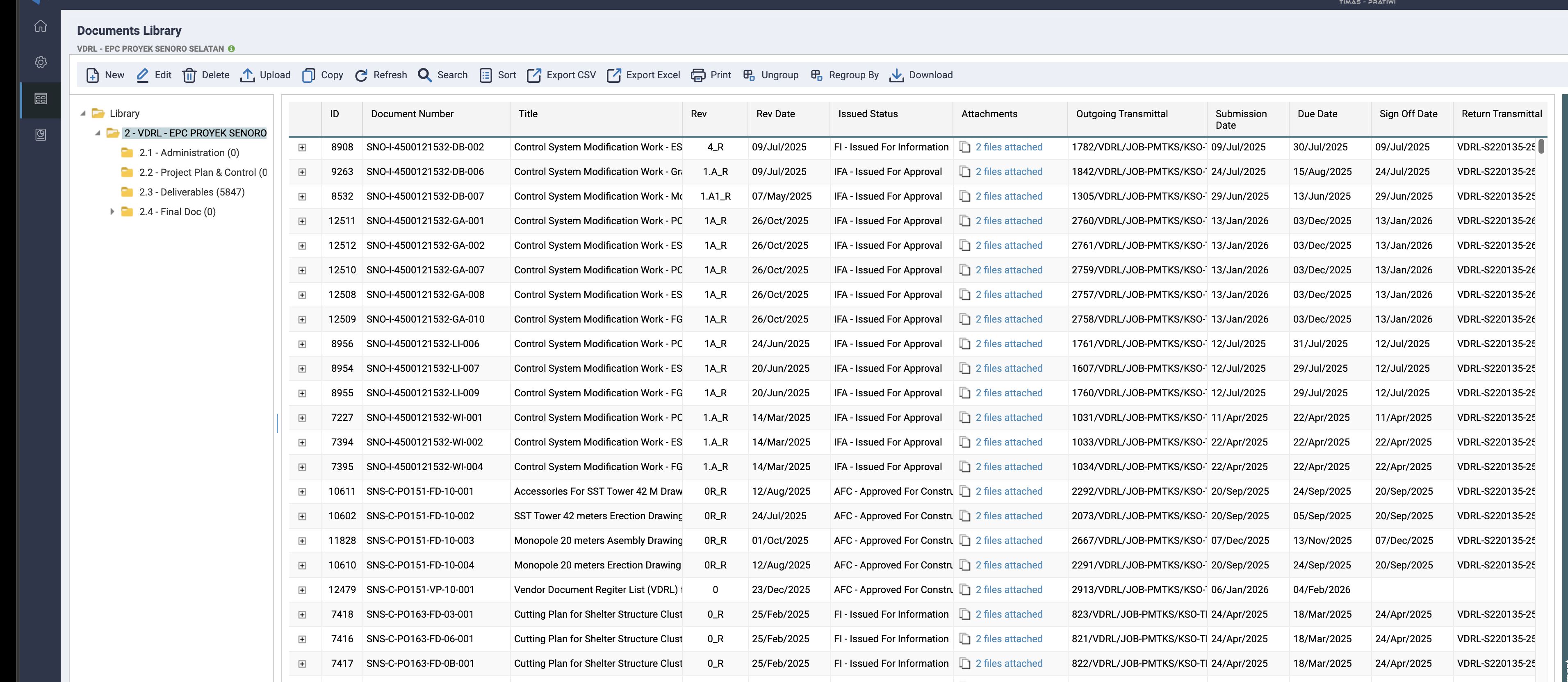
The page is documents.php with the template documents_browse.htm, laid out in three parts:
- The folder tree on the left (
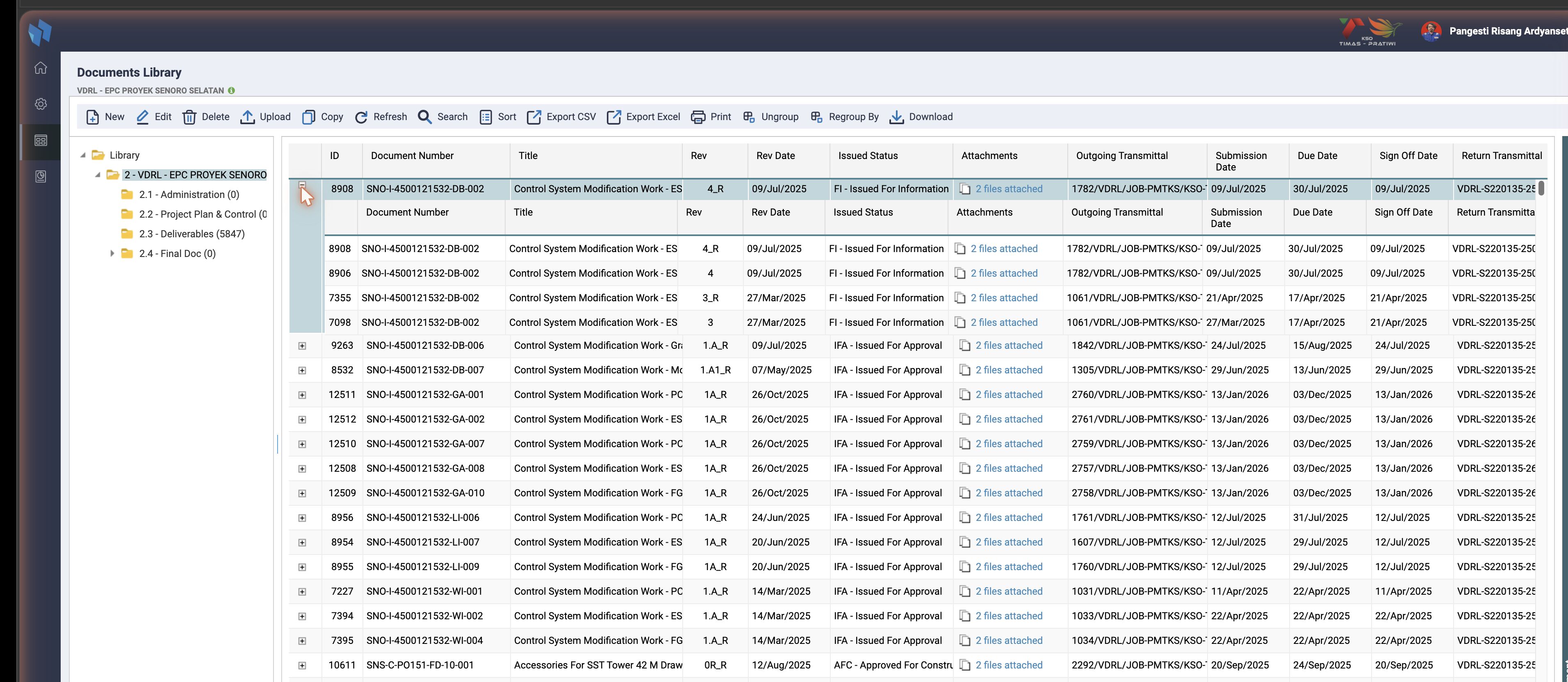
cmd=groupby, built bydocuments_groupby.inc.phpfromts_doc_libraryjoined to the project's folders). The root is the project; KTP's VDRL project has Administration, Project Plan & Control, Deliverables and Final Doc under it, with the document count per folder. Selecting a folder filters the grid onmap.library_code. - The grid, one row per document with its latest revision, in the folder selected. Every row has a
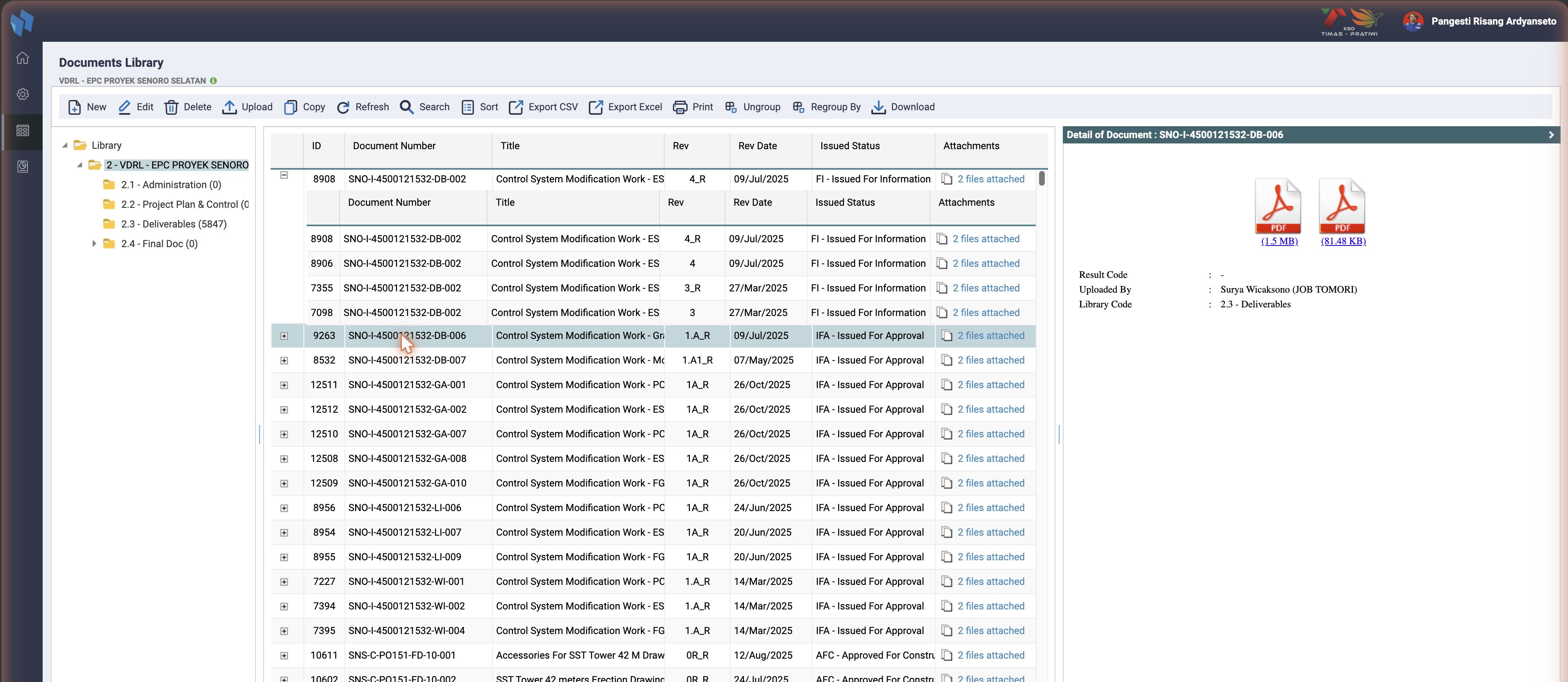
+that opens the revision sub-grid (cmd=subgrid): the same columns for every revision of that document number, so4_R,4,3_Rand3sit under one row. - Detail of Document, a panel collapsed to the right edge. Opened with its arrow and fed by a click on a row (
cmd=docdetail,document_details.php): the files with their size and a download link, Result Code, Uploaded By, Library Code, and the audit columns.
Columns
The grid columns come from get_doc_column() in documents.inc.php, and every fork extends that list. Master shows ID, Doc Type, Document Number, Title, Rev, Rev Date, VDR Rev, Issued Status, Attachments, Incoming Transmittal, Submission Date, Due Date, Sign Off Date, Returned Date, Expiration Date, Outgoing Transmittal, Return Code, Next Expected Submission, Project Code, Area, Well Site, Originator (Company and Person), Discipline, Document Type, Document Category, System Code, Drawing Category, Contract / PO Number, Document Classification, Function Code, Author, Document Index, Remarks, MDR / Non-MDR and Rev. Date. The Attachments cell is a link that lists the files.
Toolbar
Five buttons are added by documents_header.inc.php according to the user's documents privileges; the rest are fixed in the template.
| Button | Privilege | What it does |
|---|---|---|
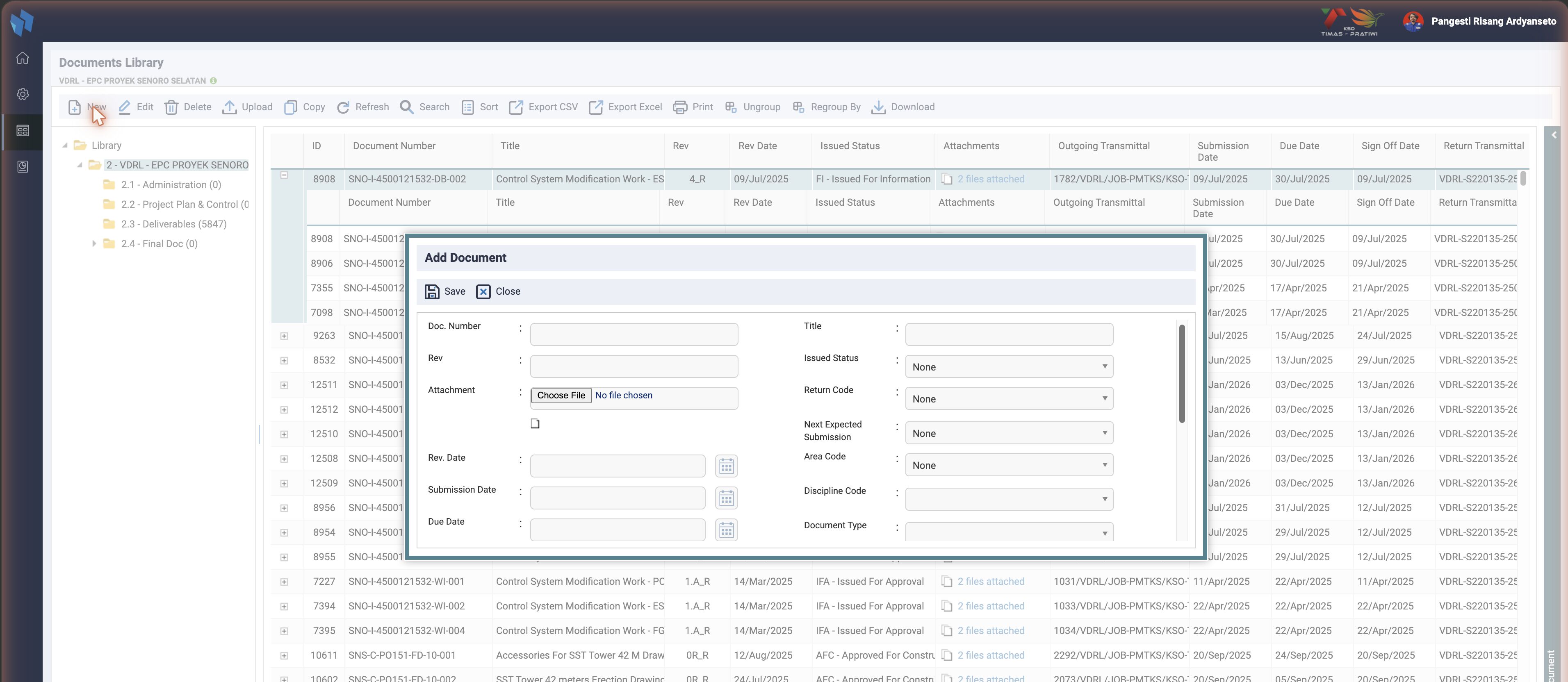
| New | add | the Add Document form (act=add): register row, folder placements, system mappings (ts_map_doc_system). With auto numbering on, the form offers a generated number |
| Edit | edit | act=edit rewrites the register row and re-creates the folder placements and system mappings |
| Delete | delete | act=deletedata removes the register rows, their file links, folder placements and system mappings |
| Upload | add | the Upload Document dialog: attach files to the selected document through the multi-file uploader (document_multiupload_upload.php). This is the library's own upload; the MDR upload that starts a routing is under Master Doc. Register |
| Copy | add | the Add form pre-filled from the selected document |
| Refresh, Search, Sort | any | reload; the Search Data dialog (basic and advanced, like the MDR one); a sort dialog on the grid columns |
| Export CSV, Export Excel | any | cmd=exportCSV, exportXLS, the grid with its current filter |
| any | the customise form of the Documents Library report (cmd=print_costume) | |
| Ungroup, Regroup By | any | cmd=regroup: group the grid by a column, with a sort column and order |
| Download | any | batch download: the selected documents' files as one zip (cmd=batchdownload) |
| Send | any | in the row menu: the send-by-email dialog, see below |
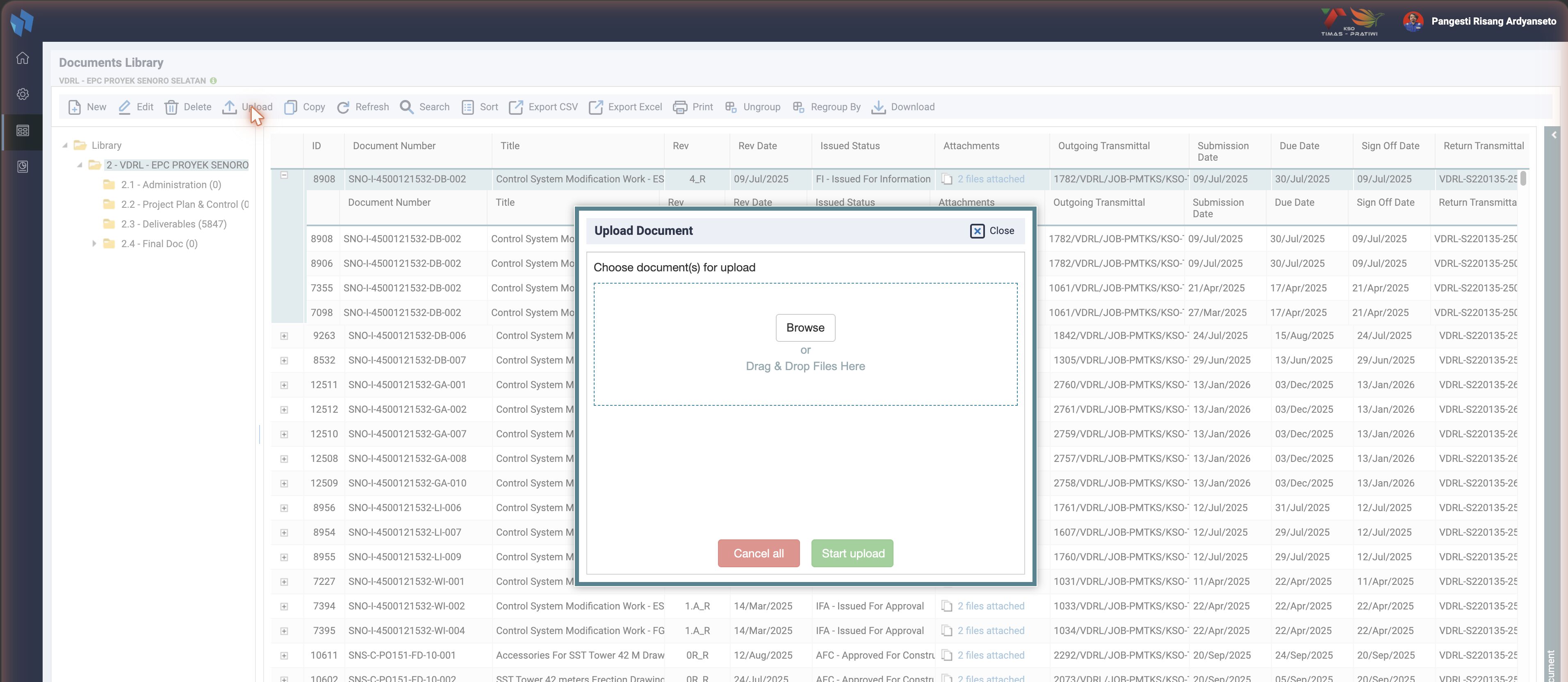
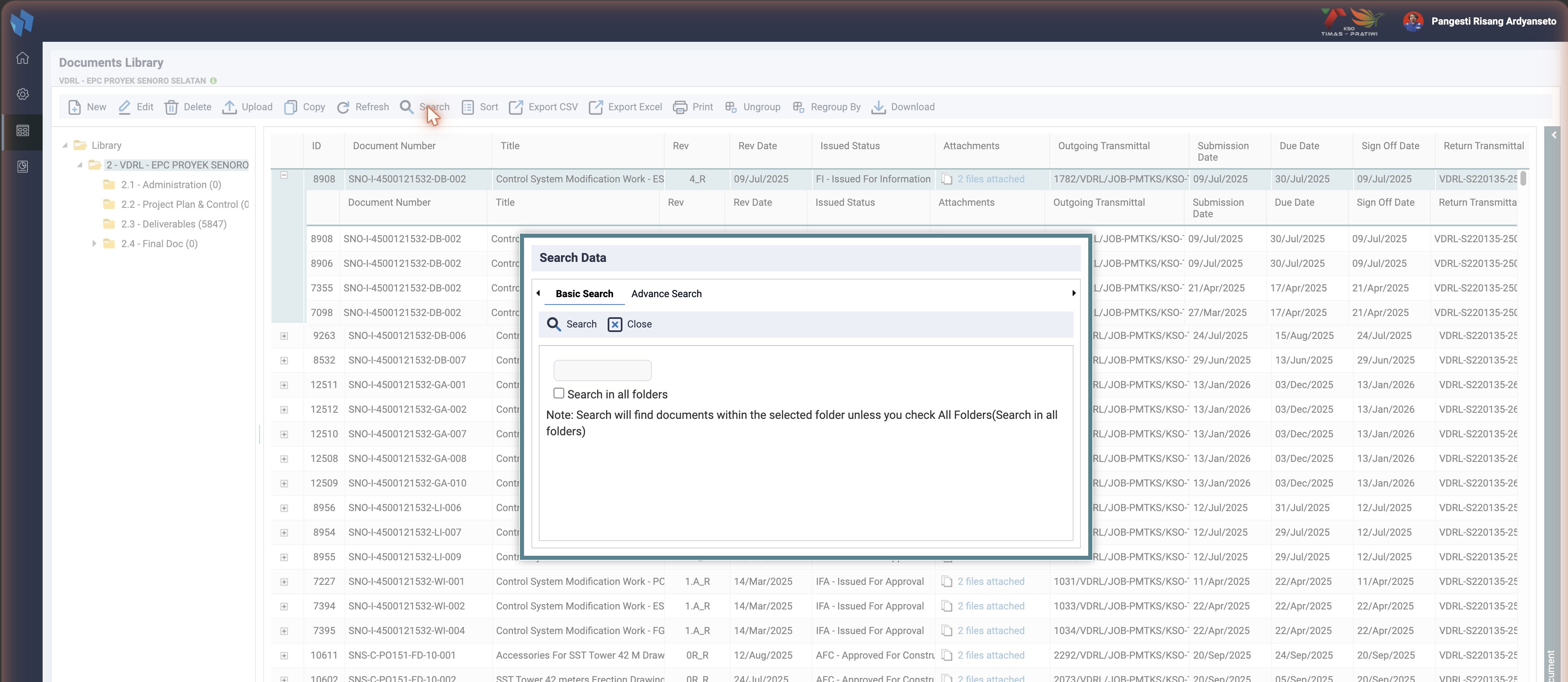
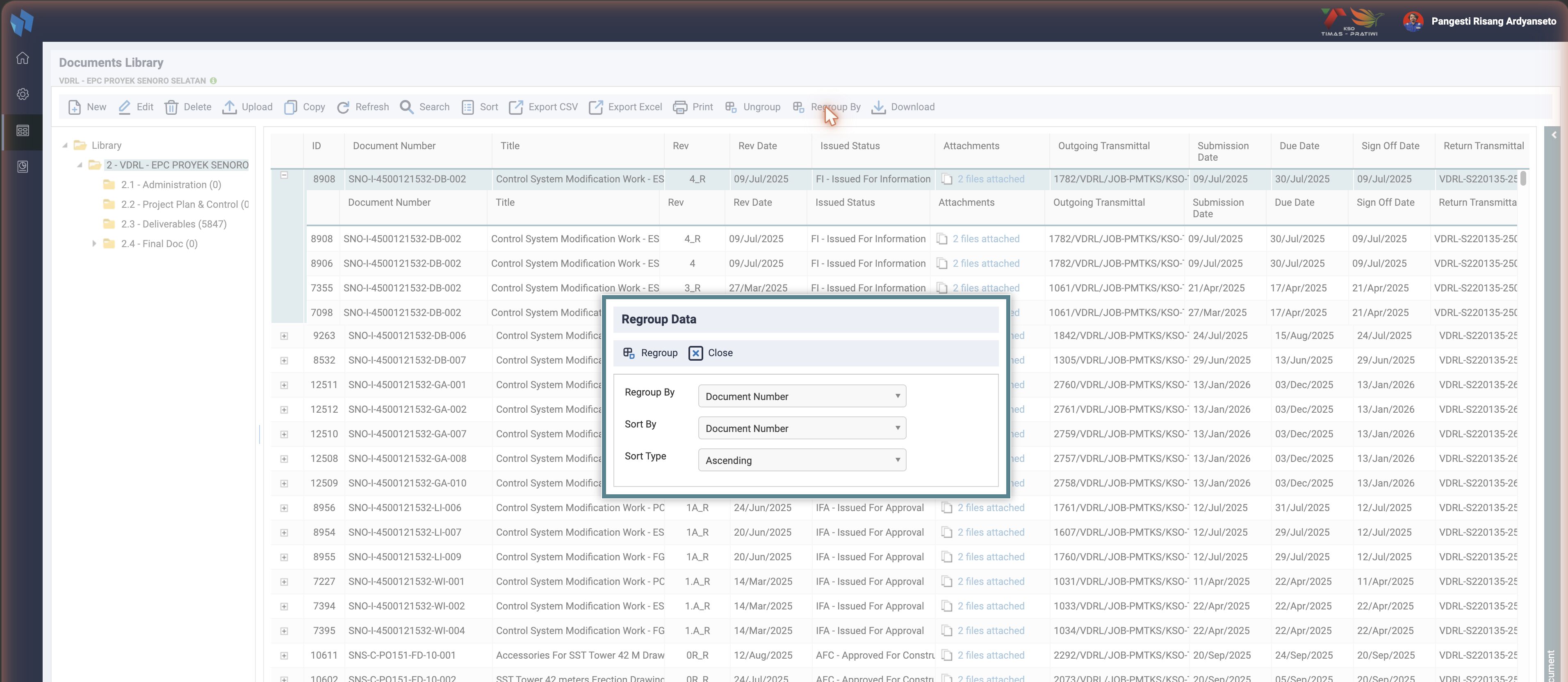
Per-row actions in the row menu: Routing detail (cmd=routdetail), Route this document (cmd=routing_this_doc, opens the routing form for a library document that did not come through the MDR), View attachments (cmd=viewattach), and the print reports listed below. The menu also offers Unpublish.
Folder access
Two mechanisms limit which folders a user sees:
ts_doc_library_priv:resource_group_id×library_id. When the user's resource group has rows here,documents.phpbuilds$filterFolderAccessso both the tree and the grid only show those folders. No rows means no restriction.library_folder_access_default(config, default1): when a folder is created, access rows are added for the project's resource groups automatically, so a new folder is not invisible by accident. See inweb_config.
ts_library_index_access (person_id × library_index_id × project_id) is a third, per-person table used by the archive and index screens under member/.
Download and watermark
Every file link is main.php?page=member&cmd=download&tp=pdf&md=document&fl=<file>&docno=<doc>. member.php hands that to download/watermark.php. If the project's watermark setting is active (watermark_active) and the type is PDF, the file is stamped through libraries/fpdf/inact_watermarking_pdf.php before it is streamed; otherwise it is streamed as is. Vendor downloads through a shared link are logged to ts_downloadfile_link.
This is the download watermark, configured under DMS Reference. It is not the enable_watermark flag, which belonged to the removed SPRD / VOID stamping at upload.
Send by email
The Send button opens documents_send_docemail.php. The user picks recipients from the project contacts (ts_map_email_sender, with a recipient type of to / cc), writes a subject and body (ts_map_email_content), and can add more documents as attachments (ts_map_email_more_attach). Two delivery modes, each behind a config flag:
| Mode | Flag | What the mail carries |
|---|---|---|
| Attachment | enable_doclib_sendby_attachment | the files themselves |
| Link | enable_doclib_sendby_link | direct download URLs built by getPdfLink(), the same cmd=download links as above |
The dialog and its handlers run on $pdo and send through PHP mail() in documents_send_attachment.inc.php and documents_send_docprjcontact.php, not through the ts_email queue that routing notifications use.
The older link path is dead in four forks
act=sendemail in document_handler_post.php is the legacy "send a download link" action. It writes ts_download_link (a random id, the recipient's hashed email, an expiry in hours) and mails the link. It runs on iw_mysql_query(), which throws in master, Jadestone, Medco and Timas, so only JOTRE can still execute it. The Send dialog does not use it.
Unpublish
The context-menu Unpublish posts act=unpublish. It is meant to take a routing-published document back: set ts_documents.docstat_id=2, ts_map_documents_library.stat_id=2, and clear rout_ispublished on ts_map_routing_file.
Dead in master, Jadestone, Medco and Timas
The whole block runs on iw_mysql_query() and mysqli_*. Clicking Unpublish in those forks ends in a fatal error. It works in JOTRE only, where the legacy helper still runs. Checked 2026-09-06.
Print reports
cmd=print_<name> renders a report template over the current filter. Each has its own documents_print_<name>.inc.php:
| Command | Report |
|---|---|
print_costume | the customisable "Documents Library" listing, which is also the DMS report in the Reporting menu |
print_docstatus | document status |
print_revstatus | revision status |
print_outstanding | outstanding documents |
print_outstandpublish | outstanding for publish |
print_ifcupdates | IFC updates |
print_vendordocprogress, print_vendoroverdue | vendor document progress and overdue |
printgrid | the grid as shown |
documents_print_cpeccproc.inc.php and documents_print_subdocprogress.inc.php exist but have no cmd= route in master.
Retention
With enable_doclib_retention = 1 the grid and the print-all report gain an Expiration Date column (ts_documents.doc_expired_date). Per-project settings live in ts_doc_retention_settings: who to notify (resources, author, originator, extra emails), when, and which email template. The cron inact_doclib_retention.php reads those settings and the documents with an expiry date and queues the notices. See Cron jobs.
Auto document numbering
With enable_auto_doc_numbering = 1 the New-document form can generate the document number. Three tables, added to master in November 2024 and ported to Prima Energy in September 2026:
| Table | Holds |
|---|---|
ts_doc_auto_numbering_settings | per project and classification: settings_data (the structure), separator, incremental digit count, sequence start |
ts_doc_auto_numbering_root | which library index a project numbers from |
ts_doc_auto_numbering_counter | the last counter per numbering structure |
How the pieces fit:
- Settings > DMS > Auto Doc Numbering (
dms_reference/auto_doc_numbering.php) holds one rule per document classification of the project: an ordered list of prefixes, the separator (hyphen or underscore), the digit count and the sequence start. The prefixes are Project Code, Classification, Company, free text, and Area Code, Discipline, Document Type and Document Category when theirenable_*flag is on. Company is the short name of the project owner, falling back to the project company. A rule row is inserted when the admin saves; a new project has none until then. - Library Index Reference > Select Root Internal Doc marks one folder of the project as the internal root (
ts_doc_auto_numbering_root) and shows an INTERNAL badge on it. The project root folder itself is refused. - Document Library > New > Auto Numbering locks Document Number, lists only the classifications that have a rule, and builds the number from the chosen references, e.g.
AAL04-TST-ENG-001.cmd=checkLastAutoNumberingCountersupplies the next sequence for that structure. On save,getAutoDocNumberingRootcreates a subfolder named after the classification under the internal root (once) and files the document there, andact=saveAutoNumberingStructbumps the counter; a clash answersexistsand the form regenerates the number.
The Tomori original (INA12-54) also offers Well Site, Division, Element and Sub Category; master and its forks do not.
Database tables affected
| Table | Operation | By |
|---|---|---|
ts_documents | insert / update / delete | New, Copy, Edit, Delete, Unpublish |
ts_map_documents_library | insert / delete | New, Edit, Delete, folder change (act=selectLibIdx) |
ts_map_doc_system | insert / delete | New, Edit, Delete |
ts_file_explorer, ts_map_doc_file | insert | Upload |
ts_map_email_sender, ts_map_email_content, ts_map_email_more_attach | insert / update / delete | Send dialog |
ts_doc_auto_numbering_counter | insert / update | auto numbering on save |
ts_doc_library, ts_doc_library_priv, ts_map_doc_lib_project | select | tree and access |
ts_downloadfile_link | update | vendor download logging |
Gotchas
- Two uploads with the same name. The library's Upload attaches files to a registered document. The Documents Master Upload registers and routes. New developers mix them up.
- A document you cannot see is usually a folder privilege. Check
ts_doc_library_privfor the resource group before reading code. - Zend ACL leftovers.
documents_privilege.inc.php(Zend_Acl overiw_mysql_query) is commented out indocuments.php, butmember_archive.inc.phpandmember_archive_search.inc.phpstill include it. Those archive screens would fatal in the forks where the legacy helper throws. - Deletes are not transactional.
act=deletedataruns several statements in sequence. documents.inc.phpstill callsiw_mysql_query()in its older helpers (folder lookups by code). Any screen that reaches those helpers dies in four of the five forks. Prefer the$pdoversions next to them.- Master and Jadestone save no classification for an auto-numbered document. With Auto Numbering on, the form disables
val_doc_classand posts the chosen class asval_classification, whichdocument_handler_post.phpnever reads, sodoc_classificationstays empty. Prima Energy resolves the id to its code and saves it (INA30-2); the other forks still have the gap.
Instance differences
Checked on 2026-09-06.
| Instance | Difference |
|---|---|
| Medco | Has an Archive feature: archivetree_submit_act and archive_form_close_act in the template, and the archive privilege action type. |
| Timas | No retention column in the template, no enable_doclib_retention, no auto document numbering, no library_folder_access_default. Older grid: no export_excel.php and no json/ column config. Its send-email files differ from master. |
| JOTRE | Unpublish and the legacy send-link path work, because iw_mysql_query() still runs there. |
| Jadestone | Matches master on every item checked. |
| Prima Energy | Auto document numbering since 2026-09-13 (INA30-2, on development and staging; main at the next release), ported from master. enable_auto_doc_numbering is seeded to 0 by migration 20260913030000, so the feature stays off after deploy; the chosen classification is saved to doc_classification. No Well Site. Checked in the browser on the local vhost. |
Related
- Upload: registers PDFs and files them into Deliverables.
- Sign Off: publishes the reviewed copy into the library.
- Auto Folder Creation: the per-project folder tree the publish step builds.
- Reporting: the Documents Library report.