Inbox
The Inbox is the main tab: the routings where you are a recipient and the routing is on your inbox, grouped by the action you have taken (Open, re-Route, Return, Sign Off, Closed Without Action). This is where you open a routing and respond.
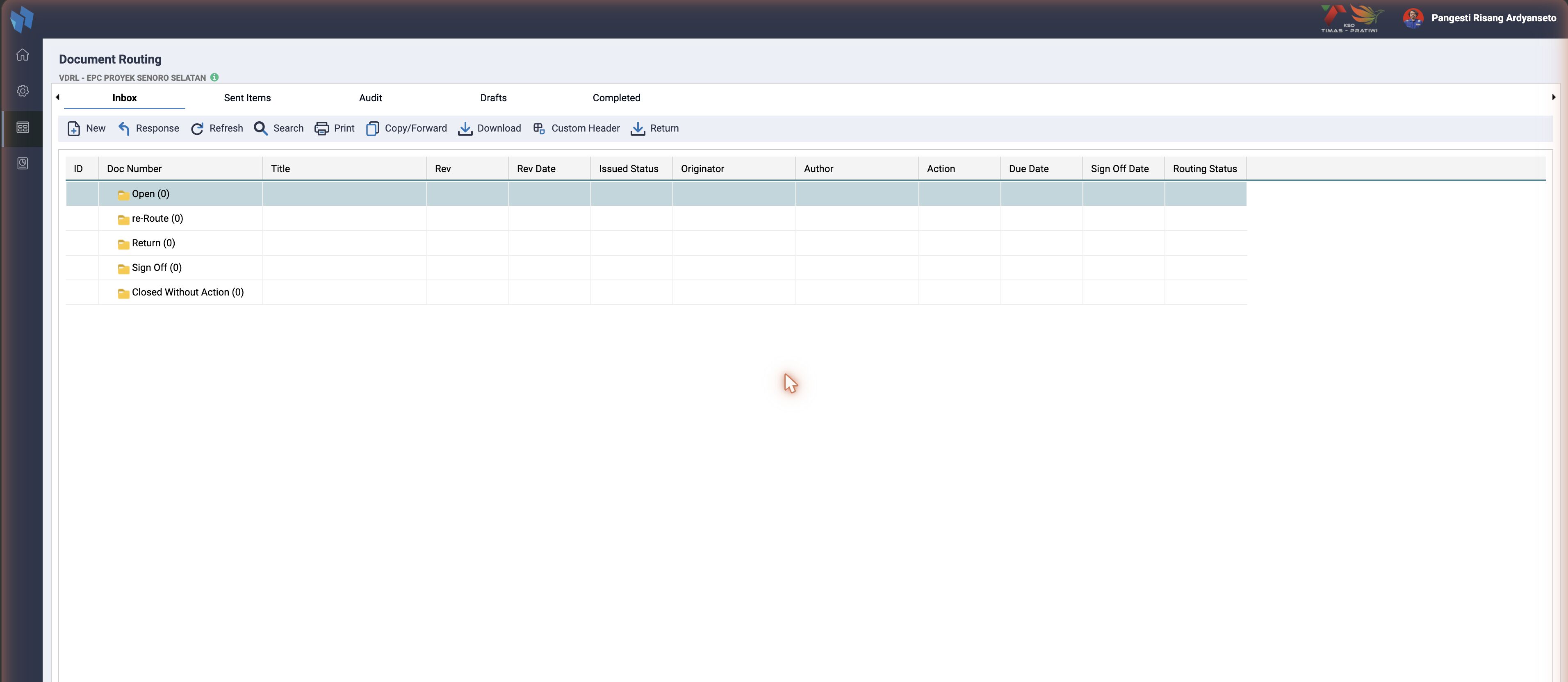
Toolbar: New, Response, Refresh, Search, Print, Copy/Forward, Sign Off (multi), Re-route (multi), Group Routing, Download, Archive, Routing Slip, Custom Header, External Transmission, Return Mailbox, Return.
Answering a routing
Response on the Inbox opens the same slip with the response block for the user's row: the action taken (Sign Off, Return, re-Route, Route as New, Closed Without Action), the result code and comments, and the commented file. What each action does, and which fields it shows, is on Sign Off), Return) and Action Indicated). Multi sign-off and re-route on the Inbox toolbar apply one answer to several selected rows.
Sign Off
Overview
Sign Off records a routing recipient's response and advances the workflow. Behaviour differs by the signer's Action Indicated (Reviewer, Information, Leader, Approver), from "record a comment and advance" up to "finalize the document and publish the reviewed copy". The core model has not changed since v2; v3 modernised the plumbing around it: PDO, feature flags, multi-project views, asynchronous publishing.
Two entry points
| Path | How | Server action |
|---|---|---|
| Single | Inbox, Response, Sign Off | act=resp with route_action=4 |
| Multiple | Inbox, select rows, Sign Off, dialog | act=multiplesignoff |
Multiple Sign Off works in master again
INA01-866 rewrote the act=multiplesignoff handler on $pdo and moved the slow work to cron/cron_multiple_signoff_v2.php. It now follows the single sign off role by role. Jadestone and Medco have their own working versions. JOTRE and Prima Energy still carry the legacy handler, and their Inbox Sign Off button is commented out. Full page: Multiple Sign Off. Checked 2026-09-16.
User flow
Single sign-off, one document
- In the Inbox, select a routing row and click Response (
inb_response_actinrouting_browse.htm). The button reads View instead of Response when the row is read-only. - The Response detail form (
routing_resp.htm) opens. It gates inputs by the viewer's action (see below). All Approval-type actions see the same standard Return Code, andA(Approval) additionally sees Next Expected Submission. Non-approval actions (Review, Information) see a Comments / No Comments choice. All have a shared Comments box. - The Sign Off button stays disabled until the required fields are set, then
lightboxRespExec(4)injs/routing.jspostsact=respwithroute_action=4.
Multiple sign-off, bulk
- In the Inbox, tick multiple rows and click Sign Off (
inb_multisignoff_act). One row ticked opens the single Sign Off window instead. - Three selection guards run on the server: same project, access to every row, and the same Action Indicated.
- A dialog window titled "Multiple Sign Off (Reviewer | For Information | Leader | Approver | Transmit | Checking | Responsible)" opens via
cmd=multisignoff&id=<ids>&mapid=<mapids>; the role comes from the selected rows. Its role fields are built server-side into{val_res_style_html}(routing_resp_multisignoff.htm), over a shared Comments box. - Click "Yes, sign off these documents", or, for D - Transmit, "Yes - Proceed routing" / "No - Return to Contractor DC".
routingMultipleSignoff()postsact=multiplesignoffand gets JSON back: the documents that could not be signed off are listed by name.
The rules per role, the rejected Return Codes and the background cron are on Multiple Sign Off.
Response fields by role
In master, Jadestone and Medco the detail form decides which inputs to show from the action's matrix type b (resp_matrix_type = ts_routing_action_indicated.action_matrix_type), not from the action label:
Matrix type b | action_desc (id) | Family | Fields shown |
|---|---|---|---|
A | Approval (9) | Approval-type | Return Code + Next Expected Submission |
D | Transmit (12) | Approval-type | Return Code |
C | Checking (15) | Approval-type | Return Code |
S | Responsible (16) | Approval-type | Return Code |
L | Leader (11) | Approval-type | Return Code, same field as A/D/C/S |
R | Review (8) | Non-approval | Comments / No Comments |
I | Information (5, non-procurement) | Non-approval | Comments / No Comments |
N | Notify (14) | Non-approval | notify-only, no inbox response |
Approval-type = A/D/C/S/L, the actions that set a Result Code and so can reject. Non-approval = R/I/N, comment or notify only. See Action Indicated) for the full definition.
All Approval-type actions share the same Return Code dropdown. Only A (Approval) additionally shows Next Expected Submission. Within A, Next Expected is still hidden for a Main-Company responder, so it effectively surfaces for a Third-Party Approver. See Next Expected bottom line.
JOTRE and Timas gate by label
Their routing_resp.htm still uses the v2 test a == 'Approval' || a == 'Transmit' || a == 'Checking' || a == 'Responsible' and a hard-coded 'Third Party' organisation string. The table above describes master.
Reality check: what is actually in the data
The table is what the form can render. Which actions a routing uses is data-driven: the MDR matrix import writes whatever matrix_rout_action codes the project's template spreadsheet contains (documents_master.inc.php). Typical matrices use a small subset, most commonly A (Approval) and L (Leader), plus R and I. D, C and S are defined and handled by the code but often absent from the matrix data. Check your project's ts_matrix_rout.
Action Indicated codes
Each recipient row carries the Action Indicated as ts_map_routing_to.rout_indicate, the numeric action_id. The common ones:
rout_indicate | Role | matrix type |
|---|---|---|
| 9 | Approval | A |
| 11 | Leader | L |
| 8 | Review | R |
| 5 | Information | I |
The full supported set, the three identifiers and the per-action rules_action config are documented under Action Indicated).
rout_status_resp: N (pending), 4 (signed off), 5 (closed without action). Unchanged since v2.
Behaviour by Action Indicated
- Reviewer / Information (
R/I): update only the signer's row torout_status_resp='4'with the comment. Advance the sequence when all non-Information rows at thatrout_sequence_nohave responded. No finalize. - Leader (
L): in master the old Leader force-close of the whole routing (rout_indicate NOT IN(9), any sequence) is commented out, and so is the reviewer-to-Leader and Leader-to-Approver email. What remains live in master's single path is one close rule: on a Leader sign-off the still-pending Reviewer (8) and Information (5) rows in the same sequence are set to'5'"Closed Without Action" (rout_indicate IN ('8', '5') AND rout_sequence_no = ...). Leader is the only Approval-type action with a non-NULL review window (rout_daysreview = 1). - Checking / Responsible (
C/S): behave like Leader on the same-sequence close in master's single path. - Approver (
A): the live finalize is inline inrouting_handler_post.php, in the block that checksrout_indicate == '9'. It setsts_map_routing_to.rout_status_resp='5'for anyone still pending, writests_routing.rout_return_status='N'plus the approve date, records the outcome onts_documents(doc_res_id,next_expected_id,doc_appdate), and emails Document Control. The functionactMultipleProcess()inrouting.inc.phplooks like this finalize but is not called from the handler in master; it still usesiw_mysql_query()and is dead code. - Transmit / DocCon (
D):Dis the Document Consolidation checkpoint. On sign-off with the auto-publish and transmittal flags on anexternalrouting, it inserts the document and files the outgoing / submission transmittal. In batch routing it is handled through the separate External Transmission flow instead of this dialog. Full detail under Action Indicated,D).
Medco reworked C / S / L in June 2026 (INA28-180, INA28-197)
In Medco the three actions share one close rule in both the single and the multiple path, C and S finalize the routing on a reject in the single path, and the Approver finalize goes through a new function, actMultipleProcessNew(). None of that is in master. Master has the same-sequence close in the single path only, no reject-finalize, and no actMultipleProcessNew().
The Approver finalize does not set rout_status='close' in master, Jadestone or Medco
The line is commented out with the note "khusus untuk AWE". The finalize sets rout_return_status='N' instead. JOTRE and Timas do close the routing: their finalize runs update ts_routing set rout_status='close' live through $pdo.
Next Expected Submission field: how it shows
The Next Expected Submission dropdown (#next_expected_submissions) is the approver's pick for what issue the system should expect next for this document. It is populated from ts_next_expected (next_expected_id, next_expected_desc), pre-selecting the document's current issued code, in routing.php. On submit it is written to ts_documents.next_expected_id. All five forks read ts_next_expected here.
It shows only when all of these hold, in routing_resp.htm:
- The responder's action is
Approval(A). The form initially reveals the field for all Approval-type actions, but conditions 4 and 5 hide it again for every one exceptA. Non-approval actions never reach this branch. - Not a batch routing (
batch_routing != 1). Bulk mode hides Return Code and Next Expected. enable_next_issue_code=1. If the config flag is0the field is always hidden. This is the simplest "why isn't it showing" answer, and the check exists in all five forks.- The responder is not the project-owner side: hidden when
resource_organization_name == organization_name_non_owneror the routing is procurement (routing_procure == 1). - For every Approval-type action other than
Approval(a != 'Approval') it is additionally hidden when the responder's Project Organization is the project-owner side (== organization_name_owner). OnlyApproval(A) is exempt.
Owner side is configurable in master, Jadestone and Medco. organization_name_owner / organization_name_non_owner are resolved from inact_operator_role (company | contractor, default contractor). With the default the project owner is the "Third Party" side. If inact_operator_role = company, the owner is the "Main Company" side and the two columns below swap. JOTRE and Timas have no such key; they compare against the literal 'Third Party'.
Next Expected bottom line
Combine conditions 4 and 5 and the result collapses to a single case, shown only to the project owner's Approval:
| Action | Non-owner responder | Project-owner responder |
|---|---|---|
A Approval | hidden (condition 4) | shown |
D/C/S/L | hidden (condition 4) | hidden (condition 5) |
Brittle string compare
Conditions 4 and 5 compare the stored ts_resource.organization_name against the resolved owner / non-owner labels. If the org value is anything else (NULL or empty, whitespace, a renamed string), neither hide fires and Next Expected leaks visible for D/C/S/L too. See the known issue on Users and Privileges. Check ts_resource.organization_name for the responder to predict what shows.
Auto-publish to the Document Library, Approver
When the Approver signs off, the reviewed and annotated copy (revision suffixed _R) is published to the library:
- Single sign-off: inline (
getPDFAfterApprove.php). - Multiple sign-off: deferred to cron. In master that is
cron/cron_multiple_signoff_v2.php, which drainsts_multiple_signoff_list(multi_status='n', one row per performer) and callsgetPDFAfterApprove.phpover curl for the_Rdocument. The oldcron_multiple_signoff.phpandgetPDFMultipleSignoffCron.phpare gone from master; JOTRE and Prima Energy still have the old name, Medco has its own_v2, Jadestone has both. See Cron jobs. - Gated by
enable_autopublish. When the flag is off, publishing is skipped. See inweb_config. - Single-sign-off auto-publish is disabled for non-MDR ("New" / doclib) routings, where the code path is wrapped in an
if (false)guard. Present in all five forks.
Transmittals generated on sign-off (enable_transmittal): DocCon versus Approver
On an external routing with enable_autopublish = 1 and enable_transmittal = 1, the finalize path also generates a transmittal PDF and files it to the document (ts_map_doc_file plus a transmittal number on ts_documents). Two different sign-offs produce two different transmittals:
| Signer | Transmittal type | Number | Stored to |
|---|---|---|---|
D (DocCon / Transmit) | Transmittal("out"), the original / submission | no suffix | ts_documents.doc_submission_number |
A (external Approver) | Transmittal("in"), the return | (R) suffix | ts_documents.outgoing_transmittal_no |
The "in / out" labels and the column names are crossed
Only the "in" (return) transmittal gets the (R) marker. The return is written to a column called outgoing_transmittal_no, the submission to doc_submission_number, and the submission number string ends in a literal -IN. In code terms: D produces the outgoing (submission) transmittal; the Approver produces the (R) return. Full breakdown under Action Indicated, D). Two older transmittal blocks in routing_handler_post.php are dead (if (false)).
Where the published copy is filed: Auto Folder Creation
This is also where the library folder structure is built. In v2 this happened at upload time; in v3 it moved here. Two mechanisms coexist:
- Legacy:
getLibCodeAutoGenerateFromDocMaster()(theproject_east_javaMedco / Ophir / East-Java hierarchies) when creating the register row. Medco only. Master, Jadestone, JOTRE and Timas do not have this function. - Per-project Auto Folder Creation, gated by the
autopublish_auto_folder_creationconfig flag:autoPublishDocumentToCustomSubfoler()reads each project's admin-customised reference-type list fromts_auto_creation_folder_settingsand builds the nested subfolders. The function exists in all five forks; the config key and the admin screen exist only in master, Jadestone and Medco. Admins configure it under DMS Reference, Auto Folder Creation. See Auto Folder Creation.
Audit log
saveRoutSignOffInfo() writes to ts_rout_signoff_info for Leader and Approver sign-offs, not for Reviewer or Information. Medco recreates this table through a phinx migration; the other forks carry no such migration.
Database tables affected
| Table | Operation | By |
|---|---|---|
ts_map_routing_to | update (rout_status_resp, rout_response, rout_comments, ...) | all |
ts_routing | update (rout_return_status='N', approve date; rout_status='close' in JOTRE and Timas only) | approver |
ts_documents | insert / update (doc_res_id, next_expected_id, doc_appdate) | approver |
ts_rout_signoff_info | insert (audit) | leader and approver only |
ts_multiple_signoff_list | insert / update | multiple sign off, one row per performer |
ts_documents (_R), ts_file_explorer, ts_map_doc_file, ts_map_documents_library, ts_map_doc_comment_sheet | insert | approver auto-publish |
Instance differences (Sign Off)
Checked on 2026-09-06.
| Instance | Difference |
|---|---|
| Jadestone | Its own act=multiplesignoff on $pdo, with extra guards (reviewers still reviewing, due date passed) and a Routing Slip in the cron. Otherwise matches master. |
| Medco | act=multiplesignoff on $pdo. Approver finalize through actMultipleProcessNew(). C/S/L share one close rule in both paths; C/S reject finalizes the routing. Keeps the legacy getLibCodeAutoGenerateFromDocMaster(). ts_rout_signoff_info migration present. The multiple sign-off cron is cron_multiple_signoff_v2.php. |
| JOTRE | iw_mysql_query() still works, so the legacy multiple sign-off handler runs, but the Inbox Sign Off button is commented out. Approver finalize sets rout_status='close'. Response form gates by label with a hard-coded 'Third Party'. No consolidated_routing_view, no enable_return_on_audit, no inact_operator_role. |
| Timas | Multiple sign-off runs the legacy handler on iw_mysql_query(), which throws there (checked 2026-09-06). Approver finalize sets rout_status='close'. Response form gates by label. No consolidated_routing_view. |
| Prima Energy | Legacy multiple sign-off handler, iw_mysql_query() throws, and the Inbox Sign Off button is commented out (checked 2026-09-16). |
| Master | Multiple Sign Off rewritten by INA01-866, see the note at the top. |
Related
- Document Routing: the overview.
- Multiple Sign Off: signing off several routings at once.
- Action Indicated: the routing action codes.